
From $49.99 · Grade A cells · Tested before it ships
Dell XPS Battery Replacement
Three XPS 13 batteries, matched by model and Dell part number. Free shipping and a 1-year warranty.
XPS 13 models do not share one battery. The 7390 takes a 51Wh pack, the 9300, 9310 and 9380 take a 52Wh pack, and the 9350 and 9343 take a 56Wh pack. Match your model to a pack below, confirm the part number on your old battery, then order. XPS 13 9360, 9370, XPS 15 and XPS 17 are not covered on this page.
Not an XPS? Inspiron owners should head to Dell Inspiron battery replacement; for Latitude and other lines, see Dell replacement battery solutions. Browsing other brands? Start at our laptop battery replacement hub.
- 🚚 Free shipping
- ↩️ 30-day returns
- 🛡️ 1-year warranty
- 🔒 Secure payment
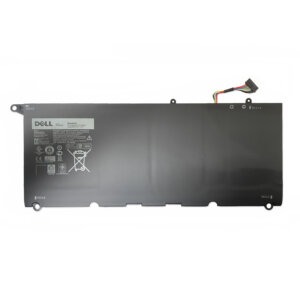
90V7W 56Wh · fits XPS 13 9350 and 9343
Dell XPS Replacement Batteries for Sale
Three batteries, one for each XPS 13 model group. Choose the card that lists your model, then check the part number printed on your old battery.
 XPS 13 · 7390 2-IN-1P103G 51Wh Battery7.6V · 51WhFits: XPS 13 7390 and 7390 2-in-1Part numbers: P103G · MM6M8 · XX3T7 · 52TWH$49.99View battery →
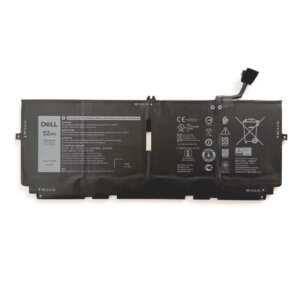 XPS 13 · 9300 · 9310 · 9380722KK 52Wh Battery7.6V · 52WhFits: XPS 13 9300, 9310 and 9380Part numbers: 722KK · FP86V · 2XXFW · WN0N0$59.99View battery →
XPS 13 · 9350 · 934390V7W 56Wh Battery7.6V · 56WhFits: XPS 13 9350 and 9343Part numbers: 90V7W · JD25G · 0DRRP · 5K9CP$59.99View battery →
Prices as of 14 October 2026, from our Dell battery collection. You pay the price shown on the product page when you order.
XPS Model Finder
Enter your model (7390, 9310, 9350) or a Dell part number (722KK, JD25G). The table keeps the pack that lists it. Clear the box to see all three.
Swipe the table sideways to see every column →
| Battery | Voltage · capacity | Fits | Part numbers | Price | |
|---|---|---|---|---|---|
| P103G | 7.6V · 51Wh | XPS 13 7390 and 7390 2-in-1The listing also names many 13-7390-D… variant codes. | P103G, MM6M8, XX3T7, 52TWH, 0MM6M8, 0XX3T7, P103G001, P103G002 | $49.99 | View |
| 722KK | 7.6V · 52Wh | XPS 13 9300, 9310 and 9380For the 9380, compare part numbers and connectors before you order. | 722KK, FP86V, 2XXFW, WN0N0 | $59.99 | View |
| 90V7W | 7.6V · 56Wh | XPS 13 9350 and XPS 13 9343The listing names many Dell variant codes for both models. | 90V7W, JD25G, 0DRRP, 0N7T6, 5K9CP, DIN02, JHXPY | $59.99 | View |
Fit data comes from the three product listings, so a model missing here is not covered by them. If yours is not found, message us on WhatsApp.
Which XPS 13 Takes Which Battery
The three batteries split the XPS 13 line by model.
XPS 13 7390 and 7390 2-in-1
The P103G (7.6V, 51Wh) is the only pack here that lists the 7390 and 7390 2-in-1, along with many 13-7390-D… variant codes.
XPS 13 9300, 9310 and 9380
The 722KK (7.6V, 52Wh) covers all three. On a 9380, compare the part number and connector with your old battery before you order.
XPS 13 9350 and 9343
The 90V7W (7.6V, 56Wh) lists both models with a long run of Dell variant codes. The 9300, 9310 and 9380 are under the 722KK instead.
XPS 13 9360, 9370, XPS 15 or XPS 17?
None of these three batteries lists these models, so we cannot confirm a fit from this page. Do not assume a neighbouring model's battery will work. Message us your exact model first, or browse the wider Dell range for other lines.
Pick Your XPS Battery in 3 Steps
Find your model
Press Windows + R, type msinfo32 and read System Model, for example "XPS 13 9310". Match that number to one of the three groups above.
Match the part number
Read the part number on your old battery, such as 722KK or 90V7W, and compare it with the Part numbers column in the finder. Our part number guide explains why this beats going by laptop name.
Confirm the watt-hours
All three packs are 7.6V, so voltage will not separate them. The Wh on your old label should match the pack you pick: 51Wh, 52Wh or 56Wh. Compare Wh, not mAh.
Is the Battery Really the Problem?
A new battery will not fix a faulty charger, driver or setting. Run these three checks first.
Compare design and full-charge capacity
In Command Prompt, run powercfg /batteryreport and open the file it saves. Then read Design Capacity against Full Charge Capacity. Our not charging guide reads above 70% as healthy, 50 to 70% as worn, and below 50% as time to replace.
Run Dell's pre-boot test
Restart, tap F12 as the Dell logo appears and pick Diagnostics. It runs outside Windows, so a driver fault cannot distort the result.
Check the case
A bulging case, a lifting trackpad or a base that rocks on a flat desk means stop. Shut the laptop down, unplug it, keep it off the charger and book a professional to replace the pack. Dell's XPS 13 9310 service manual covers handling swollen lithium-ion batteries, and our swollen battery guide lists the immediate steps.
Fitting Your XPS 13 Battery
On these XPS 13 models the battery is under the bottom panel, so the job starts with screws, not a latch. The built-in vs removable guide shows how hard that is.
Shut down
Power off fully, not sleep, and unplug the charger.
Lift the panel
Remove every base screw, then release the panel gently. The chassis is thin and flexes, so do not force it.
Disconnect, then swap
Unplug the battery connector first. Then remove the old pack's screws, lift it out and seat the new one. With the connector off, hold the power button for a few seconds to drain residual power.
Close up and charge
Refit the panel and screws and charge to 100%. The percentage may jump around for the first few charges; the setup guide has the fix.
Our guides put a screw-mounted internal pack at 15 to 45 minutes. If you would rather not open the laptop, a repair shop can fit it. The complete replacement guide covers safety in more depth.
Our batteries are replacement packs, not Dell products, and some XPS firmware checks the pack: Dell Community users report a BIOS warning on an XPS 13 9360 fitted with a non-OEM battery. The 9360 is not covered by this page. If a battery warning appears after you fit a pack, stop and send us the exact text and your model. Our OEM vs aftermarket guide covers the trade-offs.
Why Buy Your XPS Battery Here
Fit you can check
Every listing names the XPS models and Dell part numbers it covers, so you can check against your own label before paying.
Grade A cells
Every battery is tested before it ships.
12 months of cover
A limited warranty covers manufacturing defects under normal use. Unused items can be returned within 30 days.
Free standard shipping
Orders are processed in 1 to 2 business days. US orders from US stock usually arrive in 2 to 7. See the shipping policy for details.
Guides to Read Before You Order
Matching a pack, fitting it and making it last, in a few minutes each.
New to laptop batteries? The Complete 2026 Guide is a good starting point, and every battery FAQ is listed in one place →
Dell XPS Battery Replacement: Questions People Ask
Is the Dell XPS battery replaceable?
Yes. On the XPS 13 models on this page the battery sits under the bottom panel, held by small screws, so a swap needs only basic hand tools. iFixit publishes guides for the XPS 13 9343 and 9350 and for the XPS 13 9310, and Dell's XPS 13 9310 service manual has Removing the battery and Installing the battery sections. The pack has to match your exact model: use the model finder above, then check the part number on your old battery.
Is it worth it to replace a Dell laptop battery?
Yes, once a battery report shows real wear. Run powercfg /batteryreport: our not charging guide reads a full-charge capacity above 70% of design as healthy, 50 to 70% as worn and below 50% as time to replace. Dell says most users notice shorter battery life after 18 to 24 months. An XPS 13 battery here costs $49.99 to $59.99, a fraction of the price of a new laptop, so a worn pack in an otherwise sound XPS is usually worth replacing.
How much does it cost to replace a Dell XPS battery?
The battery is $49.99 for the P103G (XPS 13 7390) and $59.99 for the 722KK (9300, 9310, 9380) or the 90V7W (9350, 9343). Fit it yourself and that is the whole cost. A repair shop adds labor: our replacement cost guide puts an independent shop at $40 to $80 and an authorized service center at $50 to $100, with OEM batteries only, so roughly $90 to $140 all in at an independent shop. Those are general laptop figures, not XPS quotes, so ask for a price on your model.
Can I replace the Dell battery myself?
Usually, if you can handle small screws. iFixit's XPS 13 9310 guide calls for a T5 Torx screwdriver, a Phillips screwdriver and an opening pick: eight T5 screws release the lower case and five Phillips screws hold the battery. For the 9343 and 9350, iFixit's archived guide rates the swap Moderate at 10 to 15 minutes and says to pull the battery cable toward the battery, not up. The 9310 guide says to discharge the battery below 25% first, and warns that disconnecting it can reset BIOS settings such as the clock. Our built-in vs removable guide rates XPS as medium difficulty.
Does Best Buy replace Dell laptop batteries?
The answers conflict, so phone your store first. On Best Buy's Q&A page, a reply from a Best Buy agent (labelled a 2026 update) says Geek Squad will install a PC battery other than Apple's for $59.99 plus tax if you are not a Total member, and that you supply the pack. Two older replies quote $39.99 or say Geek Squad does not replace batteries at all, and no official terms are published there. Give the store your XPS model and ask whether they will fit a battery bought elsewhere.
Are laptop batteries worth replacing?
Yes, when the rest of the laptop still works. Our cost guide draws the line at 30%: below that share of a comparable new laptop's price, replace the battery; above it, on a laptop over 5 years old, an upgrade may make more sense. A new battery restores runtime but not a failing screen, keyboard or drive, so check those first.
How much does it cost to replace a Dell battery?
It depends on the Dell line. Our cost guide lists compatible Dell batteries at $29.99 to $39.99 for Inspiron and Vostro, $39.99 to $99.99 for Latitude and Precision and $50 to $100 for Alienware and G-Series. OEM Dell batteries cost more: $55 to $90, $70 to $220 and $90 to $170 for the same three groups. Labor is nothing if you fit it yourself, $40 to $80 at an independent shop and $50 to $100 at an authorized service center. Inspiron owners can see prices on Dell Inspiron battery replacement; the XPS 13 batteries on this page are $49.99 to $59.99.
Should I leave my Dell laptop plugged in all the time?
You can, with one setting changed. On models that support it, Dell Power Manager has Primarily AC Use, which Dell says stops charging short of 100% to lengthen battery lifespan. Our battery care guide calls the old warning partly true but outdated: with an 80% charge limit you can stay plugged in with no damage beyond normal aging. Without a limit, Battery University says staying plugged in is generally safe, but a full battery in a warm laptop ages faster.
What kills a laptop battery the most?
Heat, combined with a high charge. Battery University says elevated temperature does the most damage, and the worst case is a fully charged battery kept hot. Charge voltage matters too: a cell charged to 4.20V typically gives 300 to 500 cycles, while one held to 4.10V gives 600 to 1,000. Deep discharges and fast charging add wear. Dell advises avoiding extreme temperatures.
What happens if you leave a device plugged in even after it is 100% charged?
Once the battery is full, the charger cuts off and restarts only when the voltage sags, so it is not overcharged continuously (Battery University). The harm builds slowly: holding a lithium-ion cell near full voltage ages it, and heat speeds that up. For an XPS on AC power, a charge cap such as Dell's Primarily AC Use mode, where your model has it, and clear vents matter more than unplugging. Battery University adds that you can restore full charge about an hour before you travel.
What is the most common problem in a Dell laptop?
No official ranking exists, so go by owner reports. BGR's July 2026 round-up says battery wear is the issue consumer Dell owners raise most, drawing on Reddit threads rather than Dell data. The same piece cites motherboard failures on Latitude and Precision and a batch of Vostro laptops that overheated. For an XPS, the check takes a minute: run a battery report and compare full-charge capacity with design capacity.
XPS Not Listed? Ask Us
Not sure which pack fits, or on a different XPS? Message your model number or a battery-label photo to WhatsApp +86 184 7563 5423 and we will find the match in the Dell range. Looking for an Inspiron or Latitude instead? Go to Dell Inspiron battery replacement or Dell Replacement Battery Solutions.
Dell and XPS are trademarks of their respective owners. We use these names only to describe compatibility, and we are not associated with the brands.