“Built-in battery” sounds permanent. It’s not. Most internal batteries sit behind a bottom cover, held by three to six screws and one connector. The only thing “built-in” means is that the manufacturer didn’t give you a latch on the outside.
The real question isn’t “can it be replaced?” — it’s “how hard is it?” This guide answers that in four tiers, with a 30-second test, brand-by-brand difficulty ratings, and the cost math to decide whether DIY is worth it for your specific laptop.
Part of our Laptop Battery Replacement Guide series. Ready to replace? The step-by-step guide is here.
1. The 30-Second Test: What Type Do You Have?
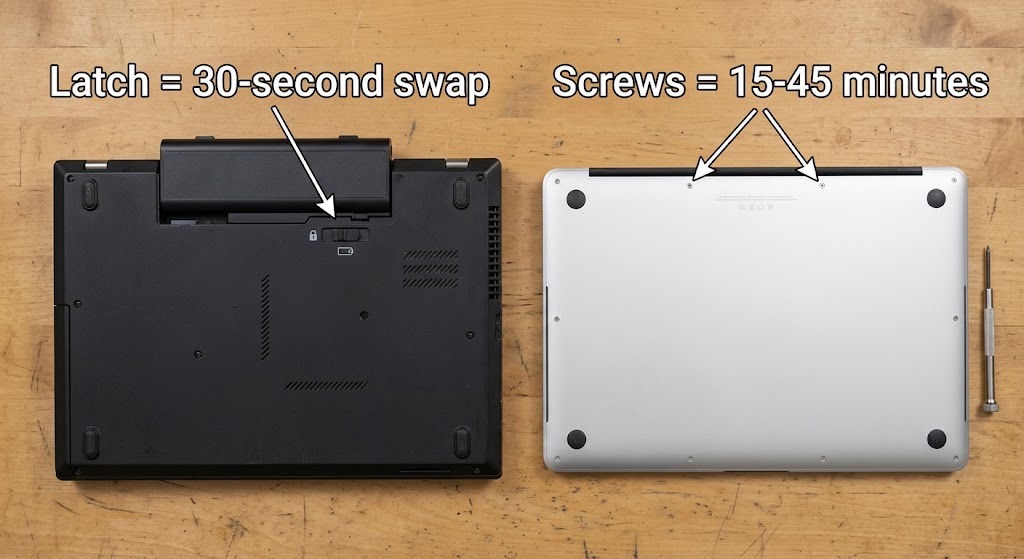
Flip your laptop over. Look at the bottom. One of three things will be there:
| What You See | Type | What It Means |
|---|---|---|
| A release latch (one or two sliding tabs) | 🟢 External removable battery | Slide the latches, the battery pops out. Swap takes 30 seconds. No tools. |
| A solid bottom panel with visible screws | 🟡 Internal screw-mounted battery | Battery is inside, held by screws. DIY-able with basic tools and 15–45 minutes. |
| A seamless bottom — no screws, no latches | 🔴 Glued-in battery | MacBook Pro, Microsoft Surface, some ultrabooks. Professional replacement recommended. |
That’s the whole test. Most laptops made after 2015 fall into the middle category. The battery is internal, but it’s a screw-mounted pack — not a sealed, permanent part.
2. The Four Difficulty Tiers
| Tier | Type | Typical Models | Tools | Time | DIY? |
|---|---|---|---|---|---|
| 🟢 Tier 1 | External, release latch | ThinkPad T480 and earlier, some Dell Latitudes, older EliteBooks | None | 30 sec | ✅ Anyone can do this |
| 🟡 Tier 2 | Internal, screw-mounted | Dell Inspiron/Latitude, HP Pavilion/EliteBook, Lenovo IdeaPad, ASUS VivoBook | Phillips #0 + plastic spudger | 15–45 min | ✅ Yes, with care |
| 🟠 Tier 3 | Internal, tight chassis, thin cables | ASUS ZenBook, some ultrabooks, thin 2-in-1s | Full kit + patience | 45–90 min | ⚠️ Only with experience |
| 🔴 Tier 4 | Glued-in battery | MacBook Pro, Microsoft Surface, some premium ultrabooks | Specialized tools + adhesive remover | Hours | ❌ Pay a professional |
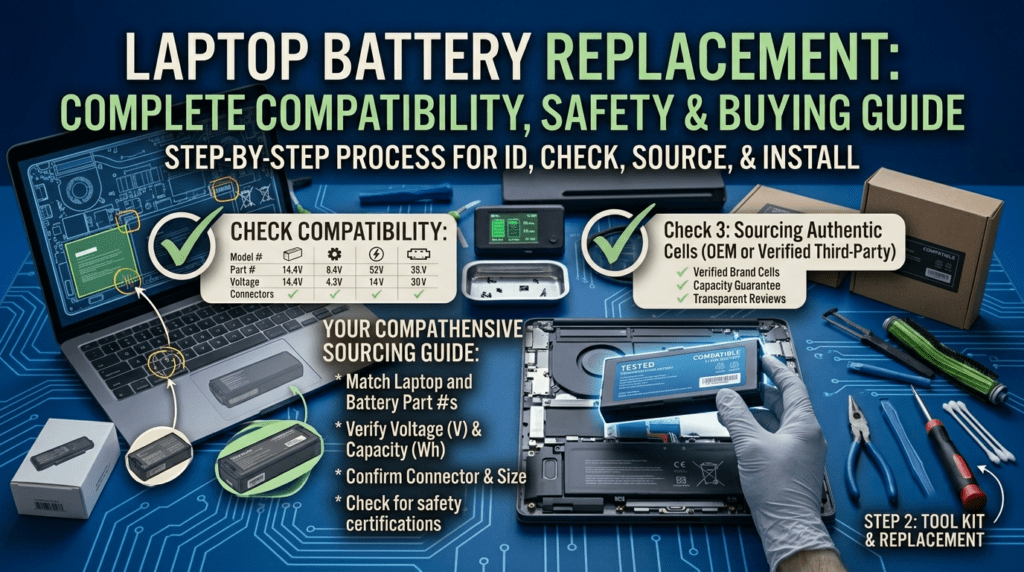
Tier 2 covers most laptops in use today. If yours falls there, you can replace the battery yourself. The procedure is the same across brands: open the bottom, disconnect the cable, swap the pack, reassemble. I’ve done it on Latitudes, EliteBooks, ThinkPads, and VivoBooks — the steps never change, only the screw locations.
3. Brand-by-Brand Difficulty
| Brand | Model Line | Difficulty | Notes |
|---|---|---|---|
| Dell | Latitude / Inspiron | 🟢🟡 Low–Medium | Business lines have excellent service manuals. Most are screw-mounted with captive screws. |
| XPS | 🟠 Medium | Tighter chassis, some adhesive strips. Watch a teardown first. | |
| HP | EliteBook / ProBook | 🟢🟡 Low–Medium | Built for IT departments to service. Sliding battery connectors, documented procedures. |
| Pavilion / Envy | 🟡 Medium | Standard screw-mounted. Some models hide screws under rubber feet. | |
| Lenovo | ThinkPad T480 and earlier | 🟢 Easy | External PowerBridge batteries. 30-second swaps. |
| IdeaPad / Legion / newer ThinkPads | 🟡 Medium | Internal screw-mounted. FRU numbers make part lookup easy. | |
| ASUS | VivoBook | 🟡 Medium | Standard internals. The captive corner screw helps open the chassis. |
| ZenBook / ROG | 🟠 Hard | Thin ribbon cables and tight clips. Careless prying cracks bezels. | |
| Apple / Microsoft | MacBook Pro / Surface | 🔴 Professional | Glued cells. Surface Laptop Studio 2 battery is glued to the back cover — the whole panel gets replaced. |
| MacBook Neo (2026) | 🟡 Medium | Exception: 18 screws, no adhesive. The most repairable Mac battery in a decade. |
4. Before You Buy: Check YOUR Model’s Difficulty
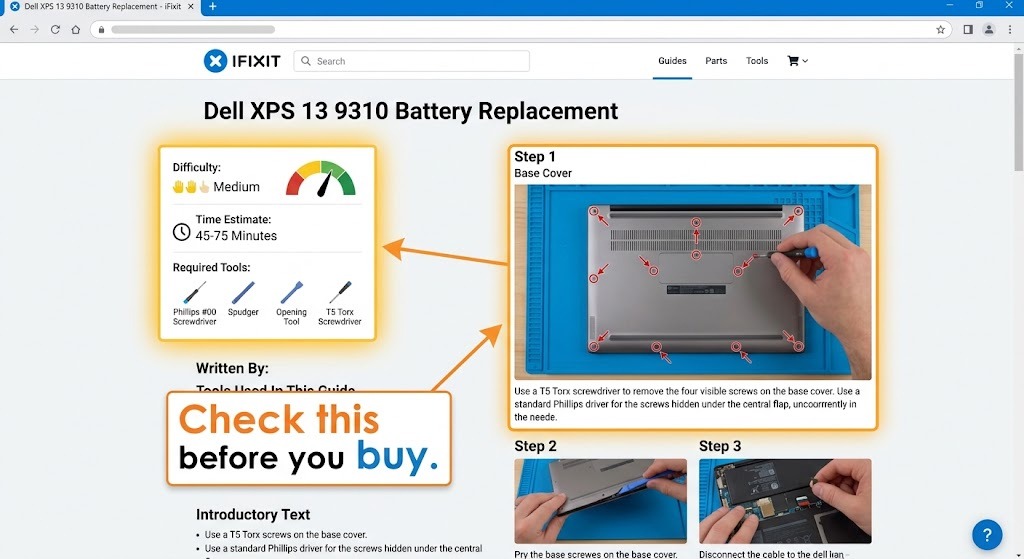
Don’t order a battery on optimism. Spend 10 minutes researching your exact model first. It’s the difference between a confident 20-minute job and a frustrating afternoon.
- Search “iFixit [your exact model]” — iFixit publishes step-by-step guides with difficulty ratings and photos for most popular laptops. If there’s no guide for your model, that’s a signal.
- Watch a teardown on YouTube. Search “[model] battery replacement.” Watch the whole thing. Pay attention to where the presenter struggles.
- Check the service manual. Dell, HP, and Lenovo publish free service manuals for business models. They list every screw, clip, and step.
I tell people this: if the teardown video makes you nervous, that’s your answer. Paying a shop $49 to do it is cheaper than the $150 repair bill after you crack a clip or tear a cable. There’s no pride lost in knowing your limits.
5. The Cost Math: DIY vs Professional
DIY saves you labor costs. But botched DIY has its own price tag. Here’s the honest math by tier.
| Tier | DIY Total | Shop Total | Failure Risk | Verdict |
|---|---|---|---|---|
| 🟢 Tier 1 | $24.99–$69.99 (battery only) | $65–$170 | ~0% | ✅ DIY — there’s nothing to break |
| 🟡 Tier 2 | $40–$135 (battery + $15 tools) | $65–$220 | Low (broken clip: cosmetic; torn cable: ~$30) | ✅ DIY — savings of $40–$100, risks are cheap |
| 🟠 Tier 3 | $40–$135 | $65–$220 | Medium (cracked bezel: $60–$120; torn ribbon: $80+) | ⚠️ DIY only with experience — one mistake eats your savings |
| 🔴 Tier 4 | Not recommended | $130–$400 | High (punctured cell = fire risk) | ❌ Always professional — this isn’t about money |
The pattern: Tier 1 and 2 DIY is nearly always worth it. Tier 3 is a judgment call — if you’ve opened laptops before, go ahead; if this is your first time, pay the shop. Tier 4 was never about saving money.
I’ve cracked one bezel in my time — a ZenBook where the clip wouldn’t release and I applied too much pressure. That $80 replacement bezel wiped out the savings from three successful DIY battery swaps. Experience is expensive. Pay for it once, or pay someone else’s experience.
6. The Industry Is Changing (2026 Update)
Repairability is coming back. The EU’s battery regulation (2023/1542) requires all portable device batteries to be user-replaceable by 2027. Manufacturers are already responding.
The most visible example: the MacBook Neo (2026). iFixit found its battery held by 18 screws — no adhesive at all — with a repairability score of 6/10. That’s the most accessible Mac battery in over a decade. It’s a direct response to the 2027 deadline.
Expect more of this across 2026 and 2027. Screw-mounted batteries will return to premium ultrabooks. Glued-in designs will fade. The “sealed laptop” era is ending — and that’s good news for anyone who wants to replace a battery without paying a $200 service fee.
Frequently Asked Questions
Can I replace a built-in laptop battery?
Yes. “Built-in” just means the battery sits inside the chassis behind the bottom cover. Most internal batteries are screw-mounted and replaceable with basic tools. Only glued-in batteries (MacBook Pro, Surface) require professional help.
How do I know if my laptop battery is removable?
Flip your laptop over. A release latch on the bottom means the battery pops out — 30-second swap. A solid bottom panel with screws means the battery is internal but DIY-able. No screws or latches at all means it’s glued in.
Is it hard to replace an internal laptop battery?
Most internal batteries are Tier 2 — screw-mounted, 15–45 minutes, basic tools. You remove the bottom cover, disconnect one cable, swap the pack, and reassemble. Watch a teardown video for your model first.
Which laptop brands are easiest to repair?
Business-class laptops lead: Dell Latitude, HP EliteBook/ProBook, and Lenovo ThinkPad. They’re built for IT departments to service, with documented procedures and screw-mounted batteries. Consumer ultrabooks and Apple/Surface devices are the hardest.
Can I replace a MacBook battery myself?
Recent MacBook Pros use glued-in cells — DIY replacement requires specialized adhesive tools and carries real risk. Apple’s service charges $159–$249. The exception: the 2026 MacBook Neo uses screws instead of glue, making it the first Mac in a decade that’s reasonably DIY-able.
How much does it cost to have a shop replace a battery?
Labor runs $40–$100 at independent shops, plus the battery. Authorized service centers charge more. DIY saves the labor but carries risk — for Tier 1 and 2 laptops the savings are worth it; for Tier 3 and 4, pay the professional.
Why did laptops switch to internal batteries?
Slimmer designs. Removing the latch mechanism and battery bay saves millimeters and grams. The trade-off was repairability. EU regulation now requires user-replaceable batteries by 2027, so the industry is swinging back toward screw-mounted designs.
What tools do I need for an internal battery replacement?
A Phillips #0 or #00 screwdriver, a plastic spudger or pry tool, and a container for screws. An anti-static wrist strap is a smart add-on. Total cost: about $15, one-time purchase.
References & Sources
- iFixit — Model-specific battery replacement guides with difficulty ratings and repairability scores.
- EU Battery Regulation 2023/1542 — European regulation requiring user-replaceable portable batteries by 2027.
- Dell Support — Service manuals and battery replacement documentation for Dell laptops.
- Lenovo Support — Hardware maintenance manuals and FRU documentation for ThinkPad and IdeaPad.
Know Your Tier? Get Your Battery
Tier 1 and 2 laptops are DIY-friendly. Browse replacement batteries by exact part number — Dell, HP, Lenovo, ASUS, and more. From $24.99 with a 1-year warranty.
Continue Reading