
Matched by model · Grade A cells · Tested before shipment
Dell XPS Battery Replacement
Find the battery for your XPS 13, matched by model number and part number.
The XPS 13 designation has been used for more than one generation, with the battery varying from one generation to another. As shown in our listings, the battery for the 7390 2-in-1 is not the same as that for the 9300 or the 9350. The three XPS 13 batteries available in our Dell range are listed below, together with a model finder; for each item the capacity, the part numbers and the XPS model names as given in the listing are provided so that you can verify the information before placing your order.
Not an XPS? See our Dell replacement battery solutions for Latitude and other Dell lines, or the Dell Inspiron battery replacement page.
- 🚚 Free shipping
- ↩️ 30-day returns
- 🛡️ 1-year warranty
- 🔒 Secure payment
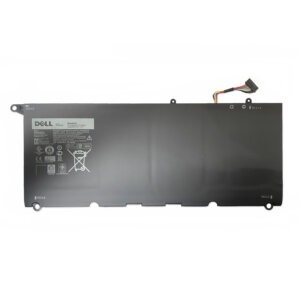
90V7W 56Wh · fits XPS 13 9350 and 9343
Dell XPS Replacement Batteries for Sale
Three XPS 13 packs, one for each model group. Pick the one that lists your model, and if you can see your old battery, match the part number printed on it.
 XPS 13 · 7390 2-IN-1P103G 51Wh Battery7.6V · 51WhFits: XPS 13 7390 and 7390 2-in-1Part numbers: P103G · MM6M8 · XX3T7 · 52TWH$49.99View battery →
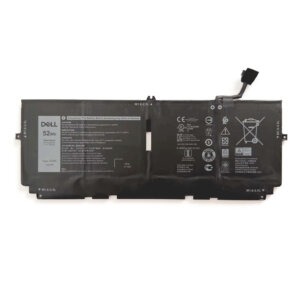 XPS 13 · 9300 · 9310 · 9380722KK 52Wh Battery7.6V · 52WhFits: XPS 13 9300, 9310 and 9380Part numbers: 722KK · FP86V · 2XXFW · WN0N0$59.99View battery →
XPS 13 · 9350 · 934390V7W 56Wh Battery7.6V · 56WhFits: XPS 13 9350 and 9343Part numbers: 90V7W · JD25G · 0DRRP · 5K9CP$59.99View battery →
XPS 13 · 9300 · 9310 · 9380722KK 52Wh Battery7.6V · 52WhFits: XPS 13 9300, 9310 and 9380Part numbers: 722KK · FP86V · 2XXFW · WN0N0$59.99View battery →
XPS 13 · 9350 · 934390V7W 56Wh Battery7.6V · 56WhFits: XPS 13 9350 and 9343Part numbers: 90V7W · JD25G · 0DRRP · 5K9CP$59.99View battery →
Prices are as listed on our Dell battery collection on 14 October 2026. The product page always shows the current price.
XPS Model Finder
Type your model number, such as 7390, 9310 or 9350. The table narrows to the battery whose listing names that model. A part number such as 722KK works too.
Swipe the table sideways to see every column →
| Battery | Voltage · capacity | Fits | Part numbers | Price | |
|---|---|---|---|---|---|
| P103G | 7.6V · 51Wh | XPS 13 7390 and 7390 2-in-1The listing also names many 13-7390-D… variant codes. | P103G, MM6M8, XX3T7, 52TWH, 0MM6M8, 0XX3T7, P103G001, P103G002 | $49.99 | View |
| 722KK | 7.6V · 52Wh | XPS 13 9300, 9310 and 9380For the 9380, the listing advises comparing part numbers and connectors. | 722KK, FP86V, 2XXFW, WN0N0 | $59.99 | View |
| 90V7W | 7.6V · 56Wh | XPS 13 9350 and XPS 13 9343The listing names many Dell variant codes for both models. | 90V7W, JD25G, 0DRRP, 0N7T6, 5K9CP, DIN02, JHXPY | $59.99 | View |
Compatibility is taken from each product listing. Confirm with the part number on your original battery if you can read it.
Same XPS Name, Different Battery
Taken from the fit notes on the listings themselves, here is how the three batteries split across the XPS 13 line.
XPS 13 7390 and 7390 2-in-1
These take the P103G (7.6V, 51Wh). Its listing names the 7390 and the 7390 2-in-1 series, with many 13-7390-D… variant codes. The other two batteries on this page do not list the 7390.
XPS 13 9300, 9310 and 9380
These take the 722KK (7.6V, 52Wh). The listing names all three models. For the 9380 it also advises comparing part numbers and connectors, so check your label before you order.
XPS 13 9350 and 9343
These take the 90V7W (7.6V, 56Wh). The listing names both models, each with a long list of Dell variant codes. The 9300, 9310 and 9380 are listed under the 722KK instead.
XPS 13 9360, 9370, XPS 15 or XPS 17?
The three listings mentioned above do not include the names of these models, which means that this page cannot verify that they match. It is not possible to assume that the battery from a nearby model will be suitable. If you send us the model number or a photo of the label on your battery, we will check it against Dell's full range.
Choose the Right XPS Battery in 3 Steps
Get the exact model
Press Windows + R, type msinfo32 and read the System Model line, for example "XPS 13 9310". The same name is printed on the label under the laptop.
Match the part number
The old battery's label carries a part number such as 722KK or 90V7W. If you have already opened the base, read it there. See our part number guide.
Compare voltage and watt-hours
All three batteries here are listed at 7.6V, so voltage will not tell them apart. Match the model and part number first, then use Wh, not mAh, to compare capacity.
Is It Really the Battery? Check Before You Buy
Two quick checks tell you whether the pack has aged or something else is wrong.
Run a battery report
Open Command Prompt and type powercfg /batteryreport. Open the HTML file it saves and compare Design Capacity with Full Charge Capacity. Our lifespan guide treats capacity below about 70% as a sign to replace.
Use Dell's built-in diagnostics
Restart the XPS and tap F12 at the Dell logo to open the one-time boot menu, then choose Diagnostics. The test includes a battery check. If the laptop only fails on charge, see not charging fixes first.
Stop if it is swollen
A bulging case, a lifted trackpad or a base that no longer sits flat is a fire risk. Power down, unplug and stop using the laptop. Do not press or puncture the bulge, and have the battery replaced by a professional. See what to do immediately.
What Replacing an XPS Battery Involves
The XPS 13 packs on this page sit inside the base, so a swap means opening the bottom panel. Our built-in vs removable guide shows how to judge the job before you start.
Power down
Shut the laptop down fully and unplug the charger.
Open the base
Remove the base screws and lift the bottom panel carefully, working around the edges.
Swap the pack
Disconnect the battery cable first, then unscrew the old pack and fit the new one. Press and hold the power button for about 5 seconds before you reconnect, to drain residual power.
Charge it fully
Close the panel and charge to 100%. Percentages can drift for the first two or three cycles; see the setup guide.
Most swaps take 15 to 45 minutes. If you would rather not open the laptop, a repair shop can fit the battery for you. For safety notes read the complete replacement guide.
Why Order Your XPS Battery from ReplacementBatteryMall
Matched by model
Each listing names the part numbers and XPS models it fits, so you can check before you pay.
Grade A cells, tested
Batteries are tested before shipment, and the cells are graded A.
1-year warranty
Product pages list a full year of cover against defects, plus a 30-day return window.
Free shipping
Orders are processed within 1 to 2 business days. US delivery is typically 2 to 7 business days from the US warehouse; see the shipping policy.
Battery Guides from Our FAQ
Plain-English guides on matching, replacing and caring for a laptop battery.
New to this? Start with Laptop Battery Replacement: The Complete 2026 Guide, or browse all battery FAQs →
Dell XPS Battery Replacement: Questions People Ask
How much does it cost to replace a Dell XPS battery?
The battery is only part of the bill. Our three XPS 13 listings run from $49.99 to $59.99, and what you add on top depends on who fits it. Our replacement cost guide puts a screw-mounted internal pack you fit yourself at about $40 to $135 in total, including roughly $15 of tools. An independent repair shop comes to about $70 to $200, and an authorized service center to about $130 to $440 using OEM parts only. Those are general laptop figures, not XPS quotes, so ask a shop for a price on your model.
Is it worth replacing the battery in a Dell XPS?
Weigh the battery against the laptop, not against the old battery. Our cost guide offers a 30% rule: replace the battery if it costs under 30% of a comparable new laptop. If it costs more than that and the laptop is over 5 years old, it suggests thinking about an upgrade instead. It also helps to look at the rest of the machine: a new pack restores runtime, but it will not fix a failing screen, keyboard or drive.
Can I replace a Dell XPS battery myself?
Often, yes, if you are comfortable with small screws. iFixit's archived guide for the XPS 13 9343 and 9350, the models our 90V7W covers, rates the job Moderate at 10 to 15 minutes. It calls for a T5 Torx screwdriver, a Phillips #0 screwdriver, tweezers and an opening tool. The bottom cover comes off after eight T5 screws, one more screw under the XPS flap and a pass round the clips. Four small Phillips screws then hold the battery. Pull the battery connector toward the battery, not straight up, and peel back the tape that holds the speaker cables to the pack. Our built-in vs removable guide rates XPS as medium difficulty, with a tighter chassis and some adhesive strips, so watch a teardown for your exact model first.
Does Dell warranty cover an XPS battery?
For a short time. Dell's battery warranty page says most Dell laptop batteries carry a 1-year limited warranty, and that a 3-year option has to be chosen when you buy the laptop. The battery's cover runs separately from the laptop's and counts from the laptop's invoice date, so it can end first. To check yours, look up your Service Tag on Dell's Support Services & Warranty page, open Device Details, then Product specifications. A battery with no notation has 1 year; “3 Years Limited Hardware Warranty”, “LL” or “Long Cycle Life” means 3 years. Batteries bought from us have their own 1-year cover, which excludes a wrong model or part ordered; see the warranty page.
Is it bad to leave a Dell XPS plugged in all the time?
Not necessarily. On models that support it, Dell Power Manager offers three charging modes. Primarily AC Use lowers the charge threshold so the battery never reaches 100%, which Dell says extends its lifespan. Adaptive learns your usage pattern, and Standard charges fully at a moderate rate. Our battery care guide calls the old warning that staying plugged in ruins the battery partly true but outdated: with an 80% charge limit it says you can stay plugged in with no damage beyond normal aging. Heat is the bigger risk, and Dell advises avoiding extreme temperatures.
Why is my Dell XPS plugged in but not charging to 100%?
Check for a charge limit before you blame the battery. A charge threshold can stop charging at 60 to 80%, and Primarily AC Use in Dell Power Manager keeps the pack below 100% on purpose. If it will not charge at all, our not charging guide starts with a 30-second test: shut down fully (not sleep or hibernate), plug in the charger and look for a charging light. A light points to Windows; no light points to hardware. Next, unplug everything and hold the power button for 30 seconds, then check the charger, cable and port. A new pack can arrive disconnected and may need 15 to 30 minutes on AC power before it wakes up.
How can I make my Dell XPS battery last longer?
Treat runtime and lifespan as two separate goals. For hours per charge, our battery care guide found that dropping brightness to 50% saves roughly 20% of system power. It also says a 120Hz or 144Hz panel draws about 25% more than 60Hz, so use 60Hz on battery if your screen offers a choice. For years of life, keep the laptop cool, use the original Dell adapter as Dell advises, and recharge around 20 to 30% instead of draining to zero. If it will sit unused for weeks, charge to about 50%, power it off and store it somewhere cool.
Can I use a non-Dell battery in a Dell XPS?
That depends on the fit and on the laptop's firmware. Dell's own advice is to use original parts and avoid third-party adapters or batteries. Some XPS firmware checks the pack as well: Dell Community users report a BIOS warning on an XPS 13 9360, “An installed battery is not identifiable and this system will not charge this battery pack”, with a non-OEM battery. The 9360 is not one of the models on this page, and our listings do not say how any particular XPS BIOS will react. If a battery warning appears after you fit a pack, stop and message us the exact text and your model. Our OEM vs aftermarket guide covers the trade-offs.
Can't Find Your XPS?
Send your model number, or a photo of the original battery label, on WhatsApp at +86 184 7563 5423. We will check it against our full Dell range. Using an Inspiron or Latitude instead? See Dell Inspiron battery replacement or Dell Replacement Battery Solutions.
Dell and XPS are trademarks of their respective owners. Brand and model names on this page are used solely to indicate product compatibility and are not associated with the respective brands.