
From $49.99 · Grade A cells · Tested before shipment
Dell XPS 15 9560 Battery Replacement
Genuine 56Wh 3-cell (RRCGW / H5H20) battery for Dell XPS 15 9560 builds—plus a quick guide to checking 56Wh vs. 97Wh (6GTPY) fitment. Free shipping, 1-year warranty.
The Dell XPS 15 9560 shipped in two distinct battery sizes: a 56Wh 3-cell pack (RRCGW / H5H20, 11.4V) paired with a 2.5-inch SATA drive bay, and a full-width 97Wh 6-cell pack (6GTPY, 11.4V) for M.2 SSD-only configurations. Open the bottom cover and match your original part number before ordering.
Own an XPS 13 instead? See our Dell XPS 13 battery replacement page, Dell replacement battery solutions, or our laptop battery replacement hub.
- 🚚 Free shipping
- ↩️ 30-day returns
- 🛡️ 1-year warranty
- 🔒 Secure payment
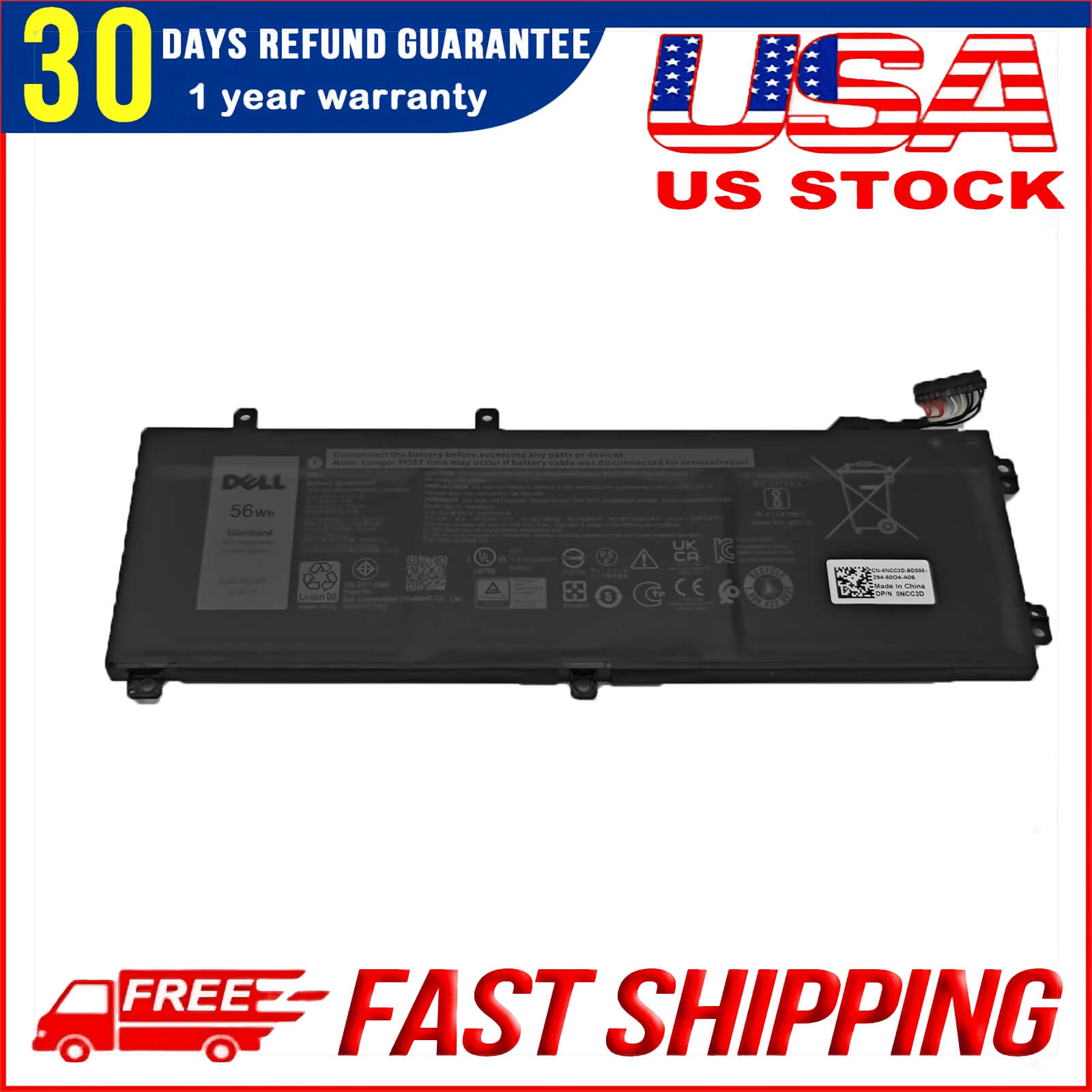
RRCGW / H5H20 56Wh (11.4V, 3-cell) · for XPS 15 9550, 9560 & 9570
Dell XPS 15 9560 Battery in Stock
In-stock Genuine replacement for the 56Wh 3-cell XPS 15 9560 configuration. Need the larger 97Wh 6GTPY pack? Check the comparison below or message support for availability.
Bulk discounts apply automatically (5% off 2+, 9% off 4+, 12% off 6+, 15% off 10+). Browse all Dell batteries.
XPS 15 9560 Battery Sizes Compared (56Wh vs. 97Wh)
The physical size of your XPS 15 9560 battery depends on whether your chassis holds a 2.5-inch SATA hard drive or SSD.
Swipe the table sideways to see every column →
| Part Number | Voltage · Capacity | Compatible P/Ns | Chassis & Drive Bay Fit | Price | |
|---|---|---|---|---|---|
| RRCGW / H5H20 | 11.4V · 56Wh · 3-cell | M7R96, 62MJV, 5041C, 5D91C | XPS 15 9560 with 2.5" SATA drive bayShorter 3-cell body; leaves room for the 2.5" HDD/SSD caddy. Not interchangeable with 6GTPY/4GVGH sizing. | $49.99 | View |
| 6GTPY / 5XJ28 | 11.4V · 97Wh · 6-cell | 6GTPY, 5XJ28, GPM03 | XPS 15 9560 (M.2 NVMe SSD only)Full-width 6-cell pack occupying the 2.5" drive space. Contact support to check stock. | Ask Support | Check Stock |
Note: The older XPS 15 9550 also used an 84Wh 6-cell pack (4GVGH), while the 9560 moved to 97Wh (6GTPY) or 56Wh (RRCGW / H5H20).
Two Checks Before Ordering for Your XPS 15 9560
Avoid ordering the wrong footprint—and check for cell swelling before charging the laptop again.
56Wh (RRCGW / H5H20) vs. 97Wh (6GTPY)
The 56Wh RRCGW / H5H20 is built specifically for 56Wh 3-cell XPS 15 9560 systems that include a 2.5-inch drive bay. If your laptop came with the long 97Wh 6GTPY battery, message our team before ordering so we can check 97Wh stock.
Raised Trackpad on Your XPS 15 9560?
A stiff or lifted glass trackpad is a classic sign of a swollen XPS 15 battery pushing up from below. Stop charging the laptop immediately, do not press on the trackpad, and replace the swollen pack safely.
Pick Your XPS 15 9560 Battery in 3 Steps
Confirm your XPS 15 model
Press Windows + R, type msinfo32, and verify System Model reads "XPS 15 9560" (or check the Service Tag label under the center XPS badge).
Check 56Wh vs. 97Wh
Open the bottom cover with a T5 Torx driver and look at the battery label: RRCGW / H5H20 (56Wh 3-cell) or 6GTPY (97Wh 6-cell).
Match the part number
Check our part number guide or send a photo of your battery label on WhatsApp if your text is faded or worn.
Is the Battery Really the Problem?
Quick diagnostics help confirm battery wear versus AC barrel-jack or motherboard charging faults.
Run a Windows battery report
Run powercfg /batteryreport in Command Prompt to compare Design Capacity vs. Full Charge Capacity. Around 70% or sudden shutdowns means it is time to replace—see our lifespan guide.
Check Dell F12 Diagnostics
Tap F12 at startup and open Diagnostics to verify the battery and 130W adapter are detected. If it will not charge, check not charging fixes.
Watch for trackpad lift
On the aluminum XPS 15 9560, a swelling cell pushes directly against the bottom of the trackpad. Power down immediately and read what to do with a swollen battery.
Fitting Your New XPS 15 9560 Battery
You will need a T5 Torx screwdriver for the outer base screws, a Phillips #00 driver for the badge screws and battery mounts, and a plastic pry tool.
Power down
Discharge below 25% if safe, shut down completely, and unplug the 130W charger.
Remove the base cover
Remove the perimeter T5 Torx screws plus the 2 Phillips screws hidden under the center XPS badge flap, then pry gently around the edges.
Swap the battery
Disconnect the battery cable from the motherboard first, unscrew the Phillips battery screws, lift out the old pack, and install the new RRCGW / H5H20.
Reassemble & calibrate
Reconnect the cable, fasten the bottom cover, charge to 100%, and run 1–2 cycles per our calibration guide.
For ESD and swollen-cell handling tips, read our complete replacement guide.
Why Buy Your XPS 15 9560 Battery Here
Exact 56Wh fit listed
Clear part-number matching (RRCGW, H5H20, M7R96, 5D91C) with zero guesswork.
Grade A cells, tested
Brand-new Grade A cells with BMS protection—voltage- and charge-tested before shipping.
1-year warranty
Full 1-year limited warranty against defects plus 30-day returns.
Free worldwide shipping
Dispatched within 2 business days from our US or China warehouse with free shipping.
Helpful Battery Guides
Guides for matching XPS 15 part numbers, handling swollen packs, and calibrating new cells.
Dell XPS 15 9560 Battery Replacement FAQ
What is the difference between the 56Wh RRCGW/H5H20 and 97Wh 6GTPY battery on the XPS 15 9560?
The 56Wh RRCGW / H5H20 is a shorter 3-cell battery made for XPS 15 9560 configurations that include a 2.5-inch SATA hard drive or SSD bay. The 97Wh 6GTPY is a full-width 6-cell battery used in M.2 SSD-only configurations with no 2.5-inch drive caddy.
How much does a Dell XPS 15 9560 battery replacement cost?
At Replacement Battery Mall, the Genuine 56Wh RRCGW / H5H20 battery is $49.99 with free shipping and a 1-year warranty. Installing it yourself takes roughly 15–20 minutes using a T5 Torx and Phillips #00 screwdriver.
What tools do I need to replace an XPS 15 9560 battery?
You need a T5 Torx screwdriver for the outer aluminum bottom-cover screws, a Phillips #00 screwdriver for the two screws beneath the center XPS badge flap and the internal battery screws, and a plastic pry tool to lift the bottom panel safely.
Does the RRCGW / H5H20 battery fit XPS 15 9550, 9570, and Precision 5520?
Yes—provided your laptop uses the 56Wh 3-cell configuration. The RRCGW / H5H20 56Wh pack is compatible with 56Wh builds of the XPS 15 9550, 9560, 9570 and Dell Precision 5510, 5520, and 5530.
My XPS 15 9560 trackpad is raised or hard to click—is that the battery?
Yes, a lifted or stiff trackpad on the XPS 15 9560 is commonly caused by a swollen lithium-ion battery pressing up from underneath. Stop charging and using the laptop, and replace the swollen pack promptly.
Unsure Between 56Wh and 97Wh on Your XPS 15 9560?
WhatsApp your Service Tag or a photo of your old battery label to +86 184 7563 5423—or email support@replacementbatterymall.com—and we will verify fitment and stock for you.
Dell, XPS, and Precision are trademarks of their respective owners. Brand and model names on this page are used solely to indicate product compatibility and are not associated with the respective brands.