
From $58.99 · Grade A cells · Tested before shipment
Dell Inspiron 15 3511 Battery Replacement
Verified 41Wh 3-cell (G91J0) and 54Wh 4-cell (V6W33) batteries for the Dell Inspiron 15 3511. Free shipping, 1-year warranty.
Dell built the Inspiron 15 3511 with two internal battery sizes: a compact 41Wh 3-cell pack (G91J0, 11.25V) for builds with a 2.5-inch drive bay, and a longer 54Wh 4-cell pack (V6W33, 15V) for M.2 SSD-only models. Check your original battery label below so you order the exact physical and electrical fit.
Other Inspiron models? Browse all Dell Inspiron battery replacements, see Dell replacement battery solutions, or visit our laptop battery replacement hub.
- 🚚 Free shipping
- ↩️ 30-day returns
- 🛡️ 1-year warranty
- 🔒 Secure payment
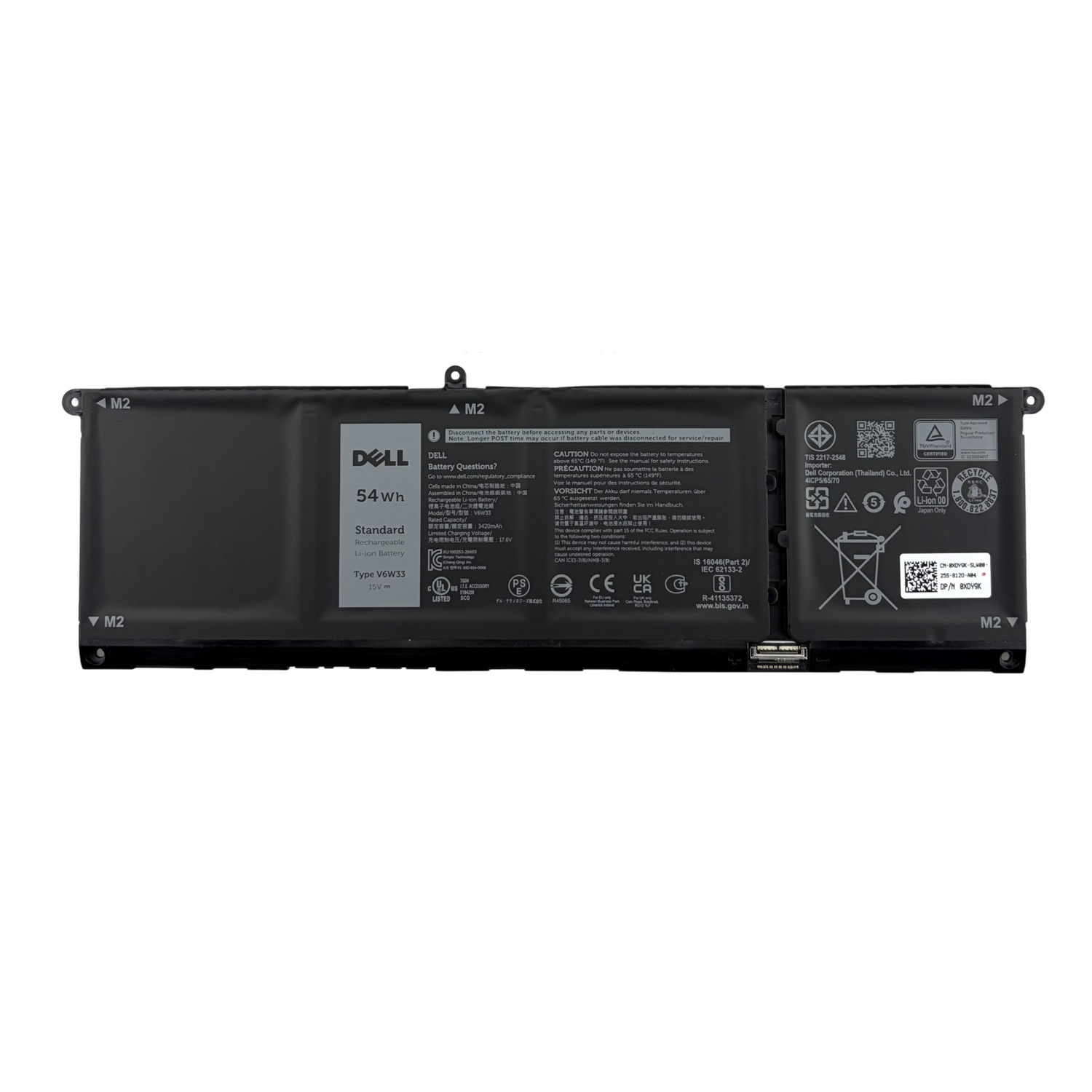
V6W33 54Wh (15V) & G91J0 41Wh (11.25V) · direct fit for Inspiron 15 3511
Dell Inspiron 15 3511 Batteries in Stock
Two battery options fit the Dell Inspiron 15 3511. Select the pack that matches your original part number and internal storage layout.
INSPIRON 15 3511 · 4-CELL HIGH CAPACITY
Genuine V6W33 54Wh Battery
15V · 54Wh · Li-ion (Genuine OEM)
Replaces: V6W33, TN70C, PG8YJ, 0WV3K8, 0VKYJX · Fits M.2 SSD-only Inspiron 15 3511, 3515, 3520 & Vostro 3510
$59.99View battery →
 INSPIRON 15 3511 · 3-CELL STANDARD
G91J0 41Wh Battery
11.25V · 41Wh · 3467mAh · 3-cell
Replaces: G91J0, 0MGCM5, 0FH3K2 · Fits Inspiron 15 3511 (including 2.5" SATA HDD/SSD builds), Vostro 3511 & Latitude 3520
$58.99View battery →
Automatic bulk discounts apply (5% off 2+, 9% off 4+, 12% off 6+, 15% off 10+). Explore our full Dell battery collection.
Inspiron 15 3511 Battery Spec Comparison
Compare voltage, capacity, part numbers, and drive-bay clearance between both Inspiron 15 3511 battery options.
Swipe the table sideways to see every column →
| Part Number | Voltage · Capacity | Compatible P/Ns | Storage & Chassis Fit | Price | |
|---|---|---|---|---|---|
| V6W33 | 15V · 54Wh · 4-cell | TN70C, PG8YJ, 0WV3K8, 0VKYJX | Inspiron 15 3511 (M.2 NVMe SSD only)Longer 4-cell pack overlaps the empty 2.5" SATA bay for ~30% extra runtime. | $59.99 | View |
| G91J0 | 11.25V · 41Wh · 3-cell | 0MGCM5, 0FH3K2 | Inspiron 15 3511 (standard & dual-drive builds)Compact 3-cell body; required if a 2.5" HDD or SATA SSD is installed. | $58.99 | View |
Not sure whether your 3511 came with a 41Wh or 54Wh pack? Remove the bottom cover or message your Service Tag to support.
Two Checks Before Ordering for Your Inspiron 15 3511
Checking your drive bay and part label prevents the most common fitment mistake on the Inspiron 15 3511.
41Wh (G91J0) vs. 54Wh (V6W33): 2.5" Drive Bay Clearance
Both packs use the same motherboard connector on the Inspiron 15 3511, but the 54Wh V6W33 extends into the 2.5-inch hard drive bay. If your laptop uses a 2.5-inch SATA HDD or SSD, order the 41Wh G91J0.
Shared Platform: Inspiron 3510, 3511, 3515 & 3520
Dell's P112F chassis spans Inspiron 15 3510, 3511, 3515, and 3520 (plus Vostro 3510 / 3511 / 3515). Still, older Inspiron 3583 / 3593 models take YRDD6 instead—always match your printed part number first.
Pick Your Inspiron 15 3511 Battery in 3 Steps
Confirm your exact model
Press Windows + R, enter msinfo32, and verify System Model shows "Inspiron 15 3511" (regulatory model P112F on the bottom cover).
Check the old battery label
Read the printed code: G91J0, 0MGCM5, or 0FH3K2 for 41Wh; V6W33, TN70C, or PG8YJ for 54Wh. Need help? See our part number guide.
Inspect the 2.5" bay before upgrading
Moving from 41Wh to 54Wh works only if your 2.5-inch SATA bay is empty and unobstructed; otherwise order the direct 41Wh G91J0 match.
Is the Battery Really the Problem?
Two quick checks confirm whether your Inspiron 15 3511 battery is worn out before you buy.
Run a Windows battery report
Open Command Prompt and type powercfg /batteryreport. Compare Design Capacity vs. Full Charge Capacity. Our lifespan guide puts the replacement mark near 70%.
Run Dell F12 Diagnostics
Restart and tap F12 at the Dell logo to open Diagnostics and check battery health and AC charger status. Not charging at all? Try our not charging fixes.
Swollen? Stop using it
If the palm rest or touchpad is pushing upward or the bottom cover will not sit flat, power down and unplug immediately. Read our swollen battery safety guide.
Fitting Your New Inspiron 15 3511 Battery
The Inspiron 15 3511 uses an internal screw-mounted pack that takes 15–25 minutes with a Phillips #1 screwdriver. Review built-in vs removable batteries if this is your first swap.
Power down
Discharge below 25% if safe, shut down completely, and unplug the AC adapter.
Open the bottom cover
Loosen the captive rear screws and remove the remaining base screws, then lift gently along the hinge seam with a plastic pick.
Swap the battery
Unplug the battery cable from the motherboard first, hold the power button for 5 seconds, remove the battery screws, and install your new G91J0 or V6W33.
Charge & calibrate
Reassemble the cover, charge to 100%, and complete 1–2 cycles so Windows calibrates accurately. See our calibration guide.
Read our complete replacement guide for full ESD and safety precautions.
Why Buy Your Inspiron 15 3511 Battery Here
Verified part numbers
Each listing names exact voltage, Wh rating, and compatible Inspiron 15 3511 codes.
Grade A cells, tested
Every pack uses brand-new Grade A cells with BMS safety circuitry and pre-shipment testing.
1-year warranty
Full 1-year limited warranty against defects plus 30-day returns.
Free shipping
Dispatched within 2 business days from our US or China warehouse with free worldwide shipping.
Helpful Battery Guides
Practical guides on matching Dell part numbers, replacing internal packs, and extending battery life.
Dell Inspiron 15 3511 Battery Replacement FAQ
Which battery does the Dell Inspiron 15 3511 use: G91J0 or V6W33?
Depending on factory configuration, the Inspiron 15 3511 uses either the 41Wh 3-cell G91J0 (11.25V) or the 54Wh 4-cell V6W33 (15V, also labeled TN70C or PG8YJ). Check your original battery label or whether a 2.5-inch SATA drive occupies the right-hand bay before ordering.
Can I upgrade my Inspiron 15 3511 from a 41Wh G91J0 to a 54Wh V6W33?
Yes, as long as your laptop does not have a 2.5-inch SATA hard drive or SSD installed. The 54Wh V6W33 is physically longer and extends across the empty 2.5-inch drive bay. If you use a 2.5-inch drive, stick with the 41Wh G91J0.
How much does a Dell Inspiron 15 3511 battery replacement cost?
At Replacement Battery Mall, the compatible 41Wh G91J0 battery is $58.99 and the Genuine 54Wh V6W33 battery is $59.99, both with free shipping and a 1-year warranty. Replacing it yourself takes about 15–25 minutes with a Phillips #1 screwdriver.
Do Inspiron 15 3511 and Inspiron 15 3520 share the same battery?
Yes, both modern Inspiron 15 3511 and Inspiron 15 3520 (P112F chassis) models use the same G91J0 (41Wh) and V6W33 (54Wh) battery families, subject to the same 2.5-inch drive bay clearance check.
Why doesn't a new Inspiron 15 3511 battery show 100% health immediately?
New batteries ship around 40–60% charged for safe transport, and the Windows fuel gauge needs 1–2 full charge-and-discharge cycles to calibrate to the fresh cells.
Need Help Confirming G91J0 or V6W33?
WhatsApp your Dell Service Tag or a photo of your old battery label to +86 184 7563 5423—or email support@replacementbatterymall.com—and we will verify compatibility before you order.
Dell and Inspiron are trademarks of their respective owners. Brand and model names on this page are used solely to indicate product compatibility and are not associated with the respective brands.