
From $58.99 · Grade A cells · Tested before shipment
Dell Inspiron 15 3520 Battery Replacement
Direct-fit 41Wh (G91J0) and 54Wh (V6W33) batteries for the Dell Inspiron 15 3520. Free shipping, 1-year warranty.
The modern Inspiron 15 3520 shipped with two internal battery sizes: a 41Wh 3-cell pack (G91J0, 11.25V) for standard and dual-storage builds, and a longer 54Wh 4-cell pack (V6W33, 15V) for M.2 SSD-only configurations. Match the part number on your old battery below before you order.
Looking for another Inspiron model? Browse all Dell Inspiron battery replacements, see Dell replacement battery solutions, or visit our laptop battery replacement hub.
- 🚚 Free shipping
- ↩️ 30-day returns
- 🛡️ 1-year warranty
- 🔒 Secure payment
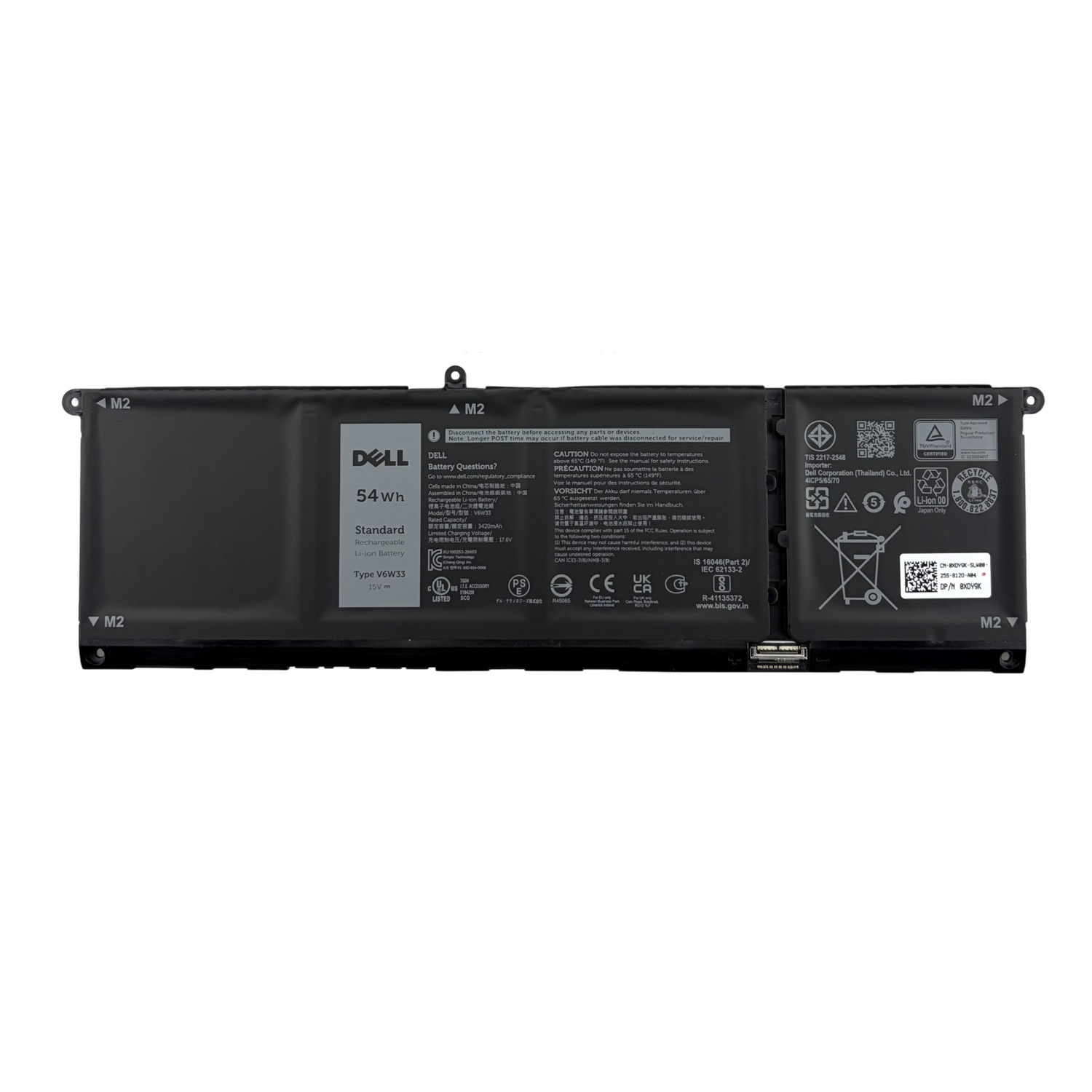
V6W33 54Wh (15V) & G91J0 41Wh (11.25V) · verified fit for Inspiron 15 3520
Dell Inspiron 15 3520 Batteries in Stock
Two verified battery configurations cover the modern Dell Inspiron 15 3520. Pick the card that matches your original part number and internal drive layout.
INSPIRON 15 3520 · 4-CELL HIGH CAPACITY
Genuine V6W33 54Wh Battery
15V · 54Wh · Li-ion (Genuine OEM)
Replaces: V6W33, TN70C, PG8YJ, 0WV3K8, 0VKYJX · Fits M.2 SSD-only Inspiron 15 3520, 3511, 3515 & Latitude 3520
$59.99View battery →
 INSPIRON 15 3520 · 3-CELL STANDARD
G91J0 41Wh Battery
11.25V · 41Wh · 3467mAh · 3-cell
Replaces: G91J0, 0MGCM5, 0FH3K2 · Fits Inspiron 15 3520 (including 2.5" SATA drive builds), Vostro 3510/3511 & Latitude 3520
$58.99View battery →
Bulk discounts available on both packs (5% off 2+, 9% off 4+, 12% off 6+, 15% off 10+). Browse our full Dell battery collection.
Inspiron 15 3520 Part Number & Spec Comparison
Every Inspiron 15 3520 battery variant compared side by side—including the legacy 2012 model so you do not order an incompatible pack.
Swipe the table sideways to see every column →
| Part Number | Voltage · Capacity | Compatible P/Ns | Chassis & Storage Fit | Price | |
|---|---|---|---|---|---|
| V6W33 | 15V · 54Wh · 4-cell | TN70C, PG8YJ, 0WV3K8, 0VKYJX | Modern Inspiron 15 3520 (M.2 SSD only)Longer 4-cell housing extends over the empty 2.5" drive bay. | $59.99 | View |
| G91J0 | 11.25V · 41Wh · 3-cell | 0MGCM5, 0FH3K2 | Modern Inspiron 15 3520 (all storage builds)Compact 3-cell body; required if a 2.5" HDD/SSD is installed. | $58.99 | View |
| J1KND | 11.1V · 48Wh · 6-cell | 04YRJH, 4T7JN, 312-0233 | Legacy 2012 Inspiron 3520 onlyExternal slide-in battery. Not compatible with modern 2022+ Inspiron 15 3520. | Ask Support | Check |
Unsure which label is inside your laptop? Message your Service Tag or a photo of the old battery to support before ordering.
Two Checks Before Ordering for Your Inspiron 15 3520
Because Dell shipped multiple configurations under the 3520 name, confirm these two details first.
41Wh (G91J0) vs. 54Wh (V6W33): Check Your 2.5" Bay
Both share the same connector on the modern Inspiron 15 3520, but the 54Wh V6W33 is physically longer and sits where a 2.5-inch SATA drive goes. If your laptop has a 2.5-inch hard drive or SSD installed, stick with the 41Wh G91J0.
Modern (2022+) vs. Legacy 2012 Inspiron 3520
The older 2012 Inspiron 3520 uses an external, clip-on 6-cell battery (part number J1KND). The modern Inspiron 15 3520 uses an internal battery screwed under the bottom cover (G91J0 or V6W33). They are not interchangeable.
Pick Your Inspiron 15 3520 Battery in 3 Steps
Confirm your generation
Press Windows + R, type msinfo32, and check System Model and processor generation, or check whether your battery is internal or clips out from the back.
Read the battery part number
Check the white label on your old battery for G91J0, 0MGCM5, V6W33, or TN70C. Need help locating it? See our part number guide.
Verify clearance & capacity
Match your original part number—or upgrade from 41Wh to 54Wh only if your 2.5-inch drive slot is empty and your chassis has the mounting holes for the 4-cell pack.
Is the Battery Really the Problem?
Run two quick checks on your Inspiron 15 3520 before ordering a replacement.
Generate a battery report
Open Command Prompt and run powercfg /batteryreport. Compare Design Capacity against Full Charge Capacity. Our lifespan guide puts the replacement point around 70% capacity.
Run Dell ePSA Diagnostics
Restart and tap F12 at the Dell logo, then select Diagnostics to test battery health and AC adapter recognition. If it fails to charge, check our not charging fixes first.
Swollen? Stop using it
A lifted touchpad, warped bottom panel, or laptop that rocks on a flat desk signals a swollen lithium-ion cell. Power down, unplug immediately, and read our swollen battery safety guide.
Fitting Your New Inspiron 15 3520 Battery
On the modern Inspiron 15 3520, the battery sits under the bottom cover and takes 15–25 minutes with a Phillips #1 screwdriver. Check built-in vs removable batteries if you are new to DIY swaps.
Power down
Discharge below 25% if possible, shut down completely, and unplug the charger.
Open the base
Loosen the captive rear screws and remove the remaining bottom-case screws, then pry gently with a plastic pick.
Swap the pack
Unplug the battery cable first, hold the power button 5 seconds to drain residual power, unscrew the old pack, and secure the new G91J0 or V6W33.
Charge & calibrate
Reattach the cover, charge to 100%, and run 1–2 cycles so Windows calibrates the fuel gauge. Read our calibration guide.
Want a full safety checklist before opening the chassis? Read the complete replacement guide.
Why Buy Your Inspiron 15 3520 Battery Here
Exact fitment listed
Every listing states voltage, Wh capacity, and exact compatible Dell part numbers.
Grade A cells, tested
Brand-new Grade A cells with BMS protection—bench-tested before shipment.
1-year warranty
Full 1-year limited warranty against defects plus 30-day hassle-free returns.
Free shipping
Dispatched within 2 business days from our US or China warehouse with free worldwide shipping.
Helpful Battery Guides
Step-by-step guides on matching part numbers, swapping internal packs, and maximizing battery health.
Dell Inspiron 15 3520 Battery Replacement FAQ
Are V6W33 and G91J0 interchangeable on the Dell Inspiron 15 3520?
They use the same connector on the modern Inspiron 15 3520, so a 41Wh G91J0 fits in place of a 54Wh V6W33. However, the 54Wh V6W33 (4-cell) is physically longer and extends into the 2.5-inch drive space—so you can only upgrade from 41Wh to 54Wh if your laptop has no 2.5-inch SATA drive installed.
How much does a Dell Inspiron 15 3520 battery replacement cost?
At Replacement Battery Mall, the compatible 41Wh G91J0 battery is $58.99 and the Genuine 54Wh V6W33 battery is $59.99, both including free shipping and a 1-year warranty. Installing it yourself takes 15–25 minutes with a Phillips #1 screwdriver and avoids repair shop labor fees.
Can I use an internal G91J0 or V6W33 battery in a 2012 Dell Inspiron 3520?
No. The legacy 2012 Dell Inspiron 3520 uses an external, clip-on 6-cell battery (part number J1KND / 11.1V). The internal G91J0 and V6W33 packs fit only the modern Inspiron 15 3520 generation.
Why does my new Inspiron 15 3520 battery arrive around 50% charged?
Lithium-ion batteries ship partially charged (typically 40–60%) for transport safety. After installation, charge it to 100% and run one or two normal discharge-and-charge cycles so Windows and Dell's fuel gauge calibrate accurately.
How long should a replacement Inspiron 15 3520 battery last?
Grade A lithium-ion cells are typically rated for 300 to 500 full charge cycles—roughly 2 to 3 years of everyday use. Keeping the cooling vents clear and enabling "Primarily AC Use" in Dell Power Manager when plugged in all day helps slow capacity wear.
Not Sure Whether You Need G91J0 or V6W33?
WhatsApp your Dell Service Tag or a photo of your old battery label to +86 184 7563 5423—or email support@replacementbatterymall.com—and we will confirm the exact fit before you order.
Dell and Inspiron are trademarks of their respective owners. Brand and model names on this page are used solely to indicate product compatibility and are not associated with the respective brands.