
From $49.99 · Grade A cells · Tested before shipment
Dell Latitude 5420 Battery Replacement
Genuine OEM 63Wh 4-cell (RJ40G) and 42Wh 3-cell (WY9DX) batteries for the Dell Latitude 5420. Free shipping, 1-year warranty.
The Dell Latitude 5420 shipped with two different battery voltages and capacities: an 11.4V 42Wh 3-cell pack (WY9DX) and a 15.2V 63Wh 4-cell pack (RJ40G). Because their voltages differ, always match the part number printed on your original Latitude 5420 battery before ordering.
Looking for other Latitude or Dell lines? See Dell replacement battery solutions, browse all Dell batteries, or visit our laptop battery replacement hub.
- 🚚 Free shipping
- ↩️ 30-day returns
- 🛡️ 1-year warranty
- 🔒 Secure payment
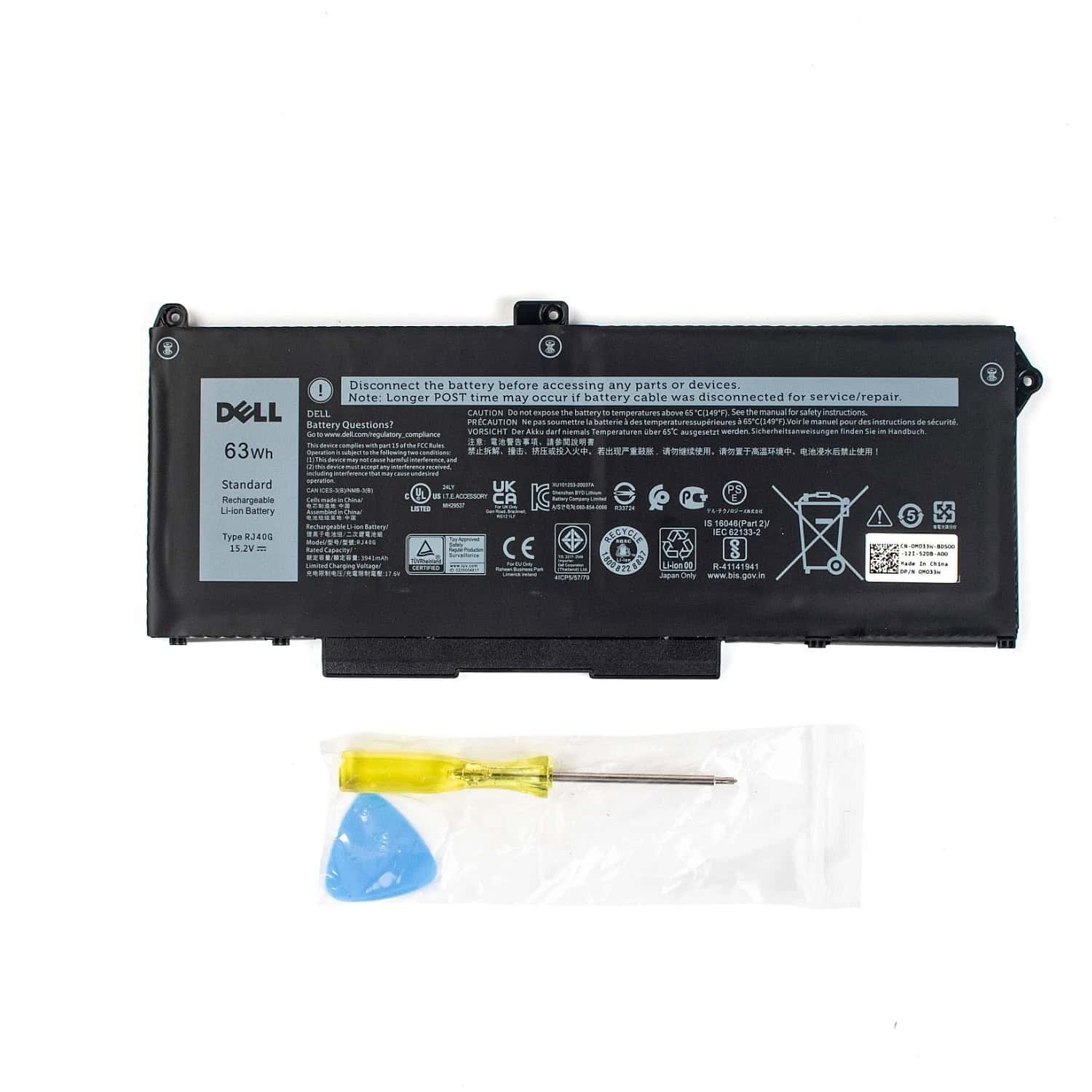
RJ40G 63Wh (15.2V) & WY9DX 42Wh (11.4V) · for Latitude 5420 / 5520 / Precision 3560
Dell Latitude 5420 Batteries in Stock
Both official Latitude 5420 battery configurations are in stock. Choose the card that matches the part number and voltage on your original pack.
LATITUDE 5420 · 4-CELL EXTENDED RUNTIME
Genuine Dell RJ40G 63Wh Battery
15.2V · 63Wh · 3941mAh · 4-cell (OEM)
Replaces: RJ40G, 01K2CF, 075X16 · Fits Latitude 5420, 5520 & Precision 3560 (US warehouse stock, Commerce, CA)
$56.99View battery →
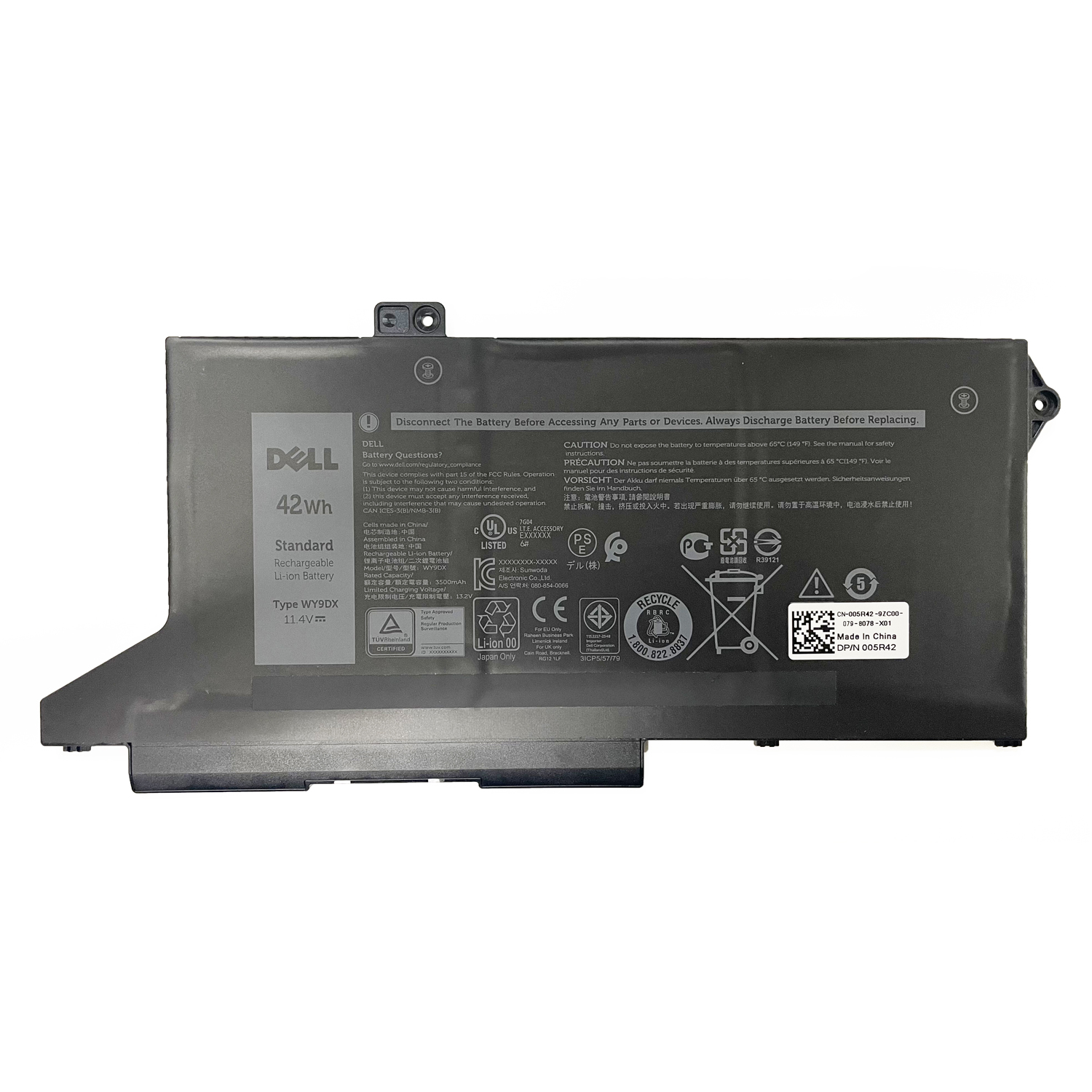 LATITUDE 5420 · 3-CELL STANDARD
Genuine WY9DX 42Wh Battery
11.4V · 42Wh · 3-cell (Genuine)
Replaces: WY9DX, 0WK3F1, 0M3KCN, 005R42 · Fits Latitude 5420, 5520 & Precision 3560 built for 11.4V 42Wh packs
$49.99View battery →
Fleet & IT discounts apply automatically (5% off 2+, 9% off 4+, 12% off 6+, 15% off 10+). Browse all Dell batteries.
Latitude 5420 Part Number & Voltage Comparison
Compare the two modern Latitude 5420 batteries—and verify you do not own the older Latitude E5420 from 2011.
Swipe the table sideways to see every column →
| Part Number | Voltage · Capacity | Compatible P/Ns | Compatible Models | Price | |
|---|---|---|---|---|---|
| RJ40G | 15.2V · 63Wh · 4-cell | RJ40G, 01K2CF, 075X16 | Latitude 5420, Latitude 5520, Precision 3560Higher-capacity 15.2V pack; ships from Commerce, CA warehouse. | $56.99 | View |
| WY9DX | 11.4V · 42Wh · 3-cell | WY9DX, 0WK3F1, 0M3KCN, 005R42 | Latitude 5420, Latitude 5520, Precision 3560Standard 11.4V pack; not the 63Wh RJ40G version. | $49.99 | View |
| M5Y0X | 11.1V · 97Wh · 9-cell | M5Y0X, T54FJ, 8858X | Legacy Latitude E5420 / E5520 / E6420 onlyExternal clip-in pack for older 2011 E-series; will not fit Latitude 5420. | See listing | View |
Match your original voltage (11.4V vs. 15.2V) and part number before placing an order.
Two Checks Before Ordering for Your Latitude 5420
Do not rely on "Latitude 5420" alone—check voltage and chassis generation first.
WY9DX (11.4V, 42Wh) vs. RJ40G (15.2V, 63Wh)
Both fit the Latitude 5420 family, but they operate at different voltages (11.4V vs. 15.2V) and have different 3-cell vs. 4-cell footprints. Replacing your existing pack with the exact same part number prevents power-delivery or boot issues.
Latitude 5420 (2021+) vs. Legacy Latitude E5420 (2011)
If your battery latches out from the bottom without removing screws, you own the older Latitude E5420 (which takes M5Y0X / T54FJ), not the internal-battery Latitude 5420.
Pick Your Latitude 5420 Battery in 3 Steps
Confirm your Latitude model
Press Windows + R, type msinfo32, and verify System Model says "Latitude 5420" (not Latitude E5420 or 5430).
Read the part number & voltage
Look at your original battery label for RJ40G (15.2V 63Wh) or WY9DX (11.4V 42Wh). See our part number guide if you need help.
Order the matching voltage
Match your original voltage and cell count so your Latitude 5420 charges reliably and fits cleanly without chassis spacers.
Is the Battery Really the Problem?
Verify battery wear on your Latitude 5420 in five minutes before replacing hardware.
Check battery wear level
Run powercfg /batteryreport in Command Prompt and compare Full Charge Capacity to Design Capacity. Our lifespan guide marks ~70% as replacement time.
Run Dell F12 Diagnostics
Press F12 on boot and run Dell Diagnostics (or check BIOS Battery Health). If USB-C charging fails, review our not charging fixes first.
Swollen? Stop using it
A warped palm rest or raised bottom cover indicates a swollen cell. Power off, unplug USB-C power, and follow our swollen battery safety guide.
Fitting Your New Latitude 5420 Battery
The Latitude 5420 uses captive bottom-cover screws and takes around 15 minutes with a Phillips #1 screwdriver. See built-in vs removable batteries for prep tips.
Power down
Discharge below 25% if safe, shut down Windows completely, and unplug USB-C power and docks.
Loosen captive screws
Loosen all 8 captive Phillips screws on the bottom cover (they stay attached) and pry gently from the hinge recesses.
Swap the battery
Unplug the battery cable from the system board first, remove the battery mounting screws, fit your new RJ40G or WY9DX, and reconnect the cable.
Charge & calibrate
Snap the base cover closed, charge to 100%, and run 1–2 cycles per our calibration guide.
Review the complete replacement guide before opening your chassis.
Why Buy Your Latitude 5420 Battery Here
Genuine OEM specs
Both RJ40G (63Wh) and WY9DX (42Wh) listings state exact voltage, capacity, and Dell part numbers.
Grade A cells, tested
Brand-new cells with BMS protection—bench-tested before shipment, never refurbished.
1-year warranty
Full 1-year warranty against manufacturing defects plus 30-day returns.
Fast US & global dispatch
Orders leave within 2 business days; RJ40G stocks in Commerce, CA with free shipping.
Helpful Battery Guides
Quick guides on Dell business laptop battery matching, installation, and lifecycle care.
Dell Latitude 5420 Battery Replacement FAQ
Are RJ40G (63Wh) and WY9DX (42Wh) interchangeable on the Dell Latitude 5420?
They run at different voltages—WY9DX is 11.4V (3-cell, 42Wh) while RJ40G is 15.2V (4-cell, 63Wh). To avoid power-delivery issues or physical fitment surprises, we recommend replacing your battery with the exact same part number and voltage printed on your original pack.
How much does a Dell Latitude 5420 battery replacement cost?
At Replacement Battery Mall, the Genuine 42Wh WY9DX battery is $49.99 and the Genuine Dell 63Wh RJ40G battery is $56.99, both with free shipping and a 1-year warranty. Bulk discounts (5%–15% off) apply automatically for IT fleet orders.
Does the Latitude 5420 battery also fit the Latitude 5520 and Precision 3560?
Yes. Both RJ40G (63Wh) and WY9DX (42Wh) are shared across the Dell Latitude 5420, Latitude 5520, and Precision 3560—just verify that the voltage and part number match your laptop's original pack.
Will a Latitude 5420 battery fit a Dell Latitude E5420?
No. The older Latitude E5420 uses an external clip-in battery (such as M5Y0X / T54FJ), whereas the modern Latitude 5420 uses an internal screw-mounted RJ40G or WY9DX battery.
How can I extend my new Latitude 5420 battery lifespan on a desk dock?
In Dell Power Manager or the BIOS, switch battery charging mode to "Primarily AC Use" if your Latitude 5420 stays plugged into a USB-C dock all day, and keep cooling vents unobstructed.
Ordering for One Laptop or an IT Fleet?
WhatsApp your Latitude 5420 Service Tag or a photo of the battery label to +86 184 7563 5423—or email support@replacementbatterymall.com—for quick fitment confirmation.
Dell, Latitude, and Precision are trademarks of their respective owners. Brand and model names on this page are used solely to indicate product compatibility and are not associated with the respective brands.