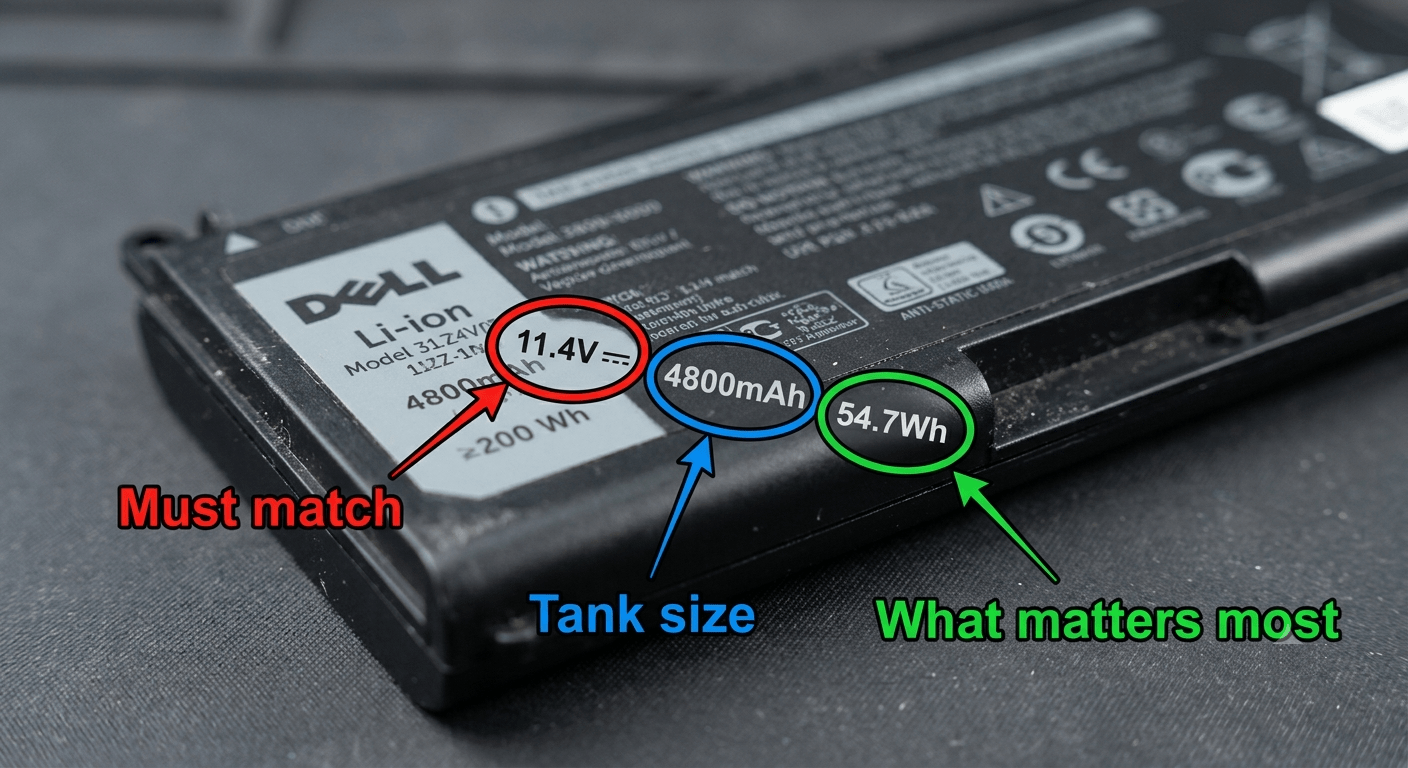
When you shop for a replacement battery, you’ll see numbers like “11.1V, 4400mAh, 48Wh.” If you ignore them and just buy by laptop model, you might get the wrong voltage. Or you might pay extra for a battery with less actual capacity than your original. This guide explains each spec in plain English — no engineering degree needed.
Part of our Laptop Battery Replacement Guide series. Not sure which battery your laptop needs? Find your part number first.
1. V, mAh, Wh — What Each One Actually Means
Three numbers. Three different things. None of them are complicated once you see the analogy.
| Spec | What It Measures | Car Analogy | Real Example |
|---|---|---|---|
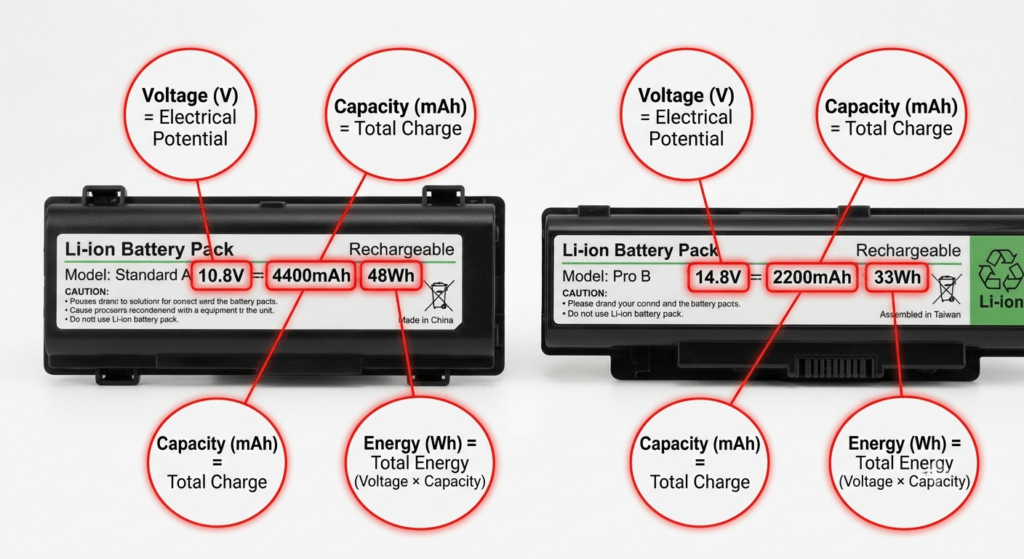
| V (Voltage) | Electrical “pressure” — how hard the electrons are pushed | Engine displacement. A V8 pushes harder than a 4-cylinder. | 11.1V — typical for a mainstream laptop |
| mAh (Milliamp-hours) | How much electric charge the battery holds | Size of the fuel tank in gallons | 4400mAh — a common mid-range capacity |
| Wh (Watt-hours) | Total energy stored — the number that actually matters | How many miles you can drive on a full tank | 48Wh — enough for about 4–6 hours of light use |
Here’s the key insight: mAh tells you how big the tank is. But it doesn’t tell you how far the car goes — because different cars burn fuel at different rates. That’s where Wh comes in. It combines tank size and the engine’s power to give you one number: total range.
2. The Only Formula You Need
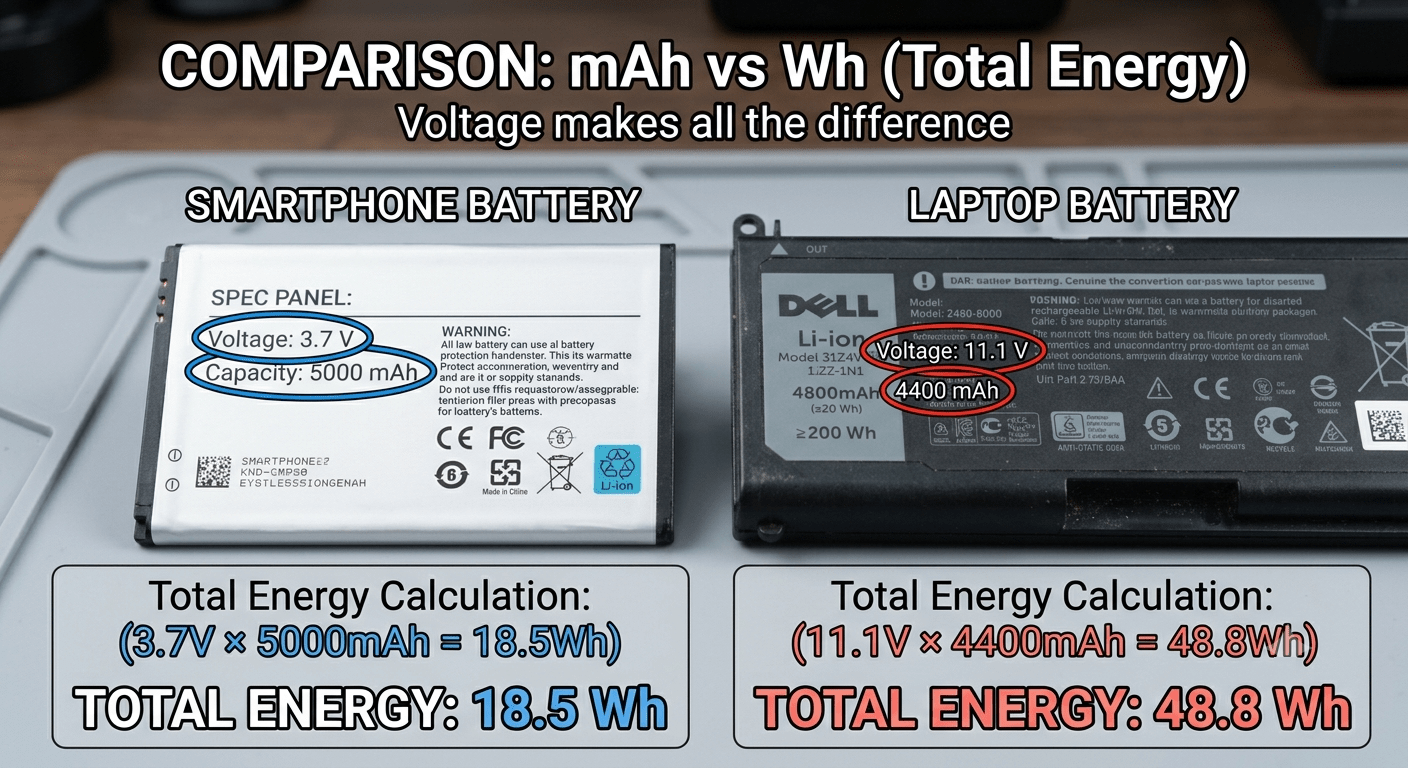
Wh = V × mAh ÷ 1000
That’s it. Multiply the voltage by the milliamp-hours, divide by 1,000. You now know the actual energy in the battery.
Here’s why this formula matters. Look at two batteries with the same mAh:
| Battery A | Battery B | |
|---|---|---|
| Voltage | 10.8V | 14.8V |
| Capacity (mAh) | 4400mAh | 4400mAh |
| Actual Energy (Wh) | 47.5Wh | 65.1Wh |
Same mAh. 37% more runtime. If you compared by mAh alone, you’d think they were equal. This isn’t a trick — it’s just physics. Battery B pushes electrons harder, so each electron carries more energy.
I’ve seen people buy a “4400mAh” replacement because the number matched their original — only to discover the replacement was 10.8V and their original was 14.8V. The new battery had 28% less energy. Always compare Wh.
I made this mistake once myself — bought a battery for an old ASUS gaming laptop by matching the mAh. It physically fit. The connector was right. But the voltage was wrong and the laptop refused to charge. I lost $40 and a week of waiting. Now I check Wh first, every time.
3. Why Wh Beats mAh for Laptops
Phone batteries all run at about 3.7V. When the voltage is the same, mAh works fine for comparison — a 5000mAh phone battery lasts longer than a 4000mAh one. Simple.
Laptop batteries run at anywhere from 7.4V to 15.2V. Comparing mAh across different voltages is like comparing gas tanks without knowing the engine size. A 4000mAh laptop battery at 14.8V stores 59.2Wh. A 5000mAh laptop battery at 7.4V stores only 37Wh. The “bigger” mAh number actually has less energy.
Airlines figured this out years ago. The TSA and IATA don’t limit batteries by mAh — they limit them by Wh. The rule is 100Wh max for carry-on lithium batteries. Why? Because a 10,000mAh battery at 3.7V is 37Wh (fine). A 10,000mAh battery at 14.8V is 148Wh (not fine). Same mAh. Completely different safety profile.
4. Cell Configurations: What “3-Cell” and “4-Cell” Mean
Inside every laptop battery are individual lithium-ion cells — each one runs at about 3.6–3.7V. Manufacturers connect them in series to get higher voltage, or in parallel to get higher capacity.
Series (S) = more voltage. Parallel (P) = more capacity. A “3S2P” battery has three cells in series (for 11.1V) and two in parallel (doubling the capacity).
| Configuration | Voltage | Typical Wh | Found In |
|---|---|---|---|
| 2-cell (2S) | 7.4–7.6V | 24–38 Wh | Thin-and-light ultrabooks, some Chromebooks |
| 3-cell (3S) | 10.8–11.55V | 36–56 Wh | Most mainstream laptops — Inspiron, Pavilion, IdeaPad, VivoBook |
| 4-cell (4S) | 14.4–15.2V | 56–99 Wh | Gaming laptops, mobile workstations |
You don’t need to memorize this. But if you see “4-cell” on a listing and your original is “3-cell,” the voltage is different — and the battery probably won’t work in your laptop. The cell count tells you the voltage architecture. Match it.
5. Voltage Matching Rules
Voltage must match. Here are the rules:
| Rule | Example | OK? |
|---|---|---|
| Same cell count, different labeling | 10.8V → 11.1V or 14.4V → 14.8V | ✅ Yes — same 3-cell or 4-cell architecture, different rounding |
| Higher Wh, same voltage | 48Wh → 56Wh (both 11.1V) | ✅ Yes — more runtime, same compatibility |
| Wrong cell count | 11.1V → 14.8V (3-cell → 4-cell) | ❌ No — could damage the charging circuit |
| Different connector or shape | Same voltage, wrong physical fit | ❌ No — won’t fit even if the specs match |
6. How to Compare Two Batteries When Shopping
You found two replacement options. Both claim to fit your laptop. Which one is better?
- Step 1: Check the voltage. Both must match your original. If one is 14.8V and your original is 11.1V — skip it.
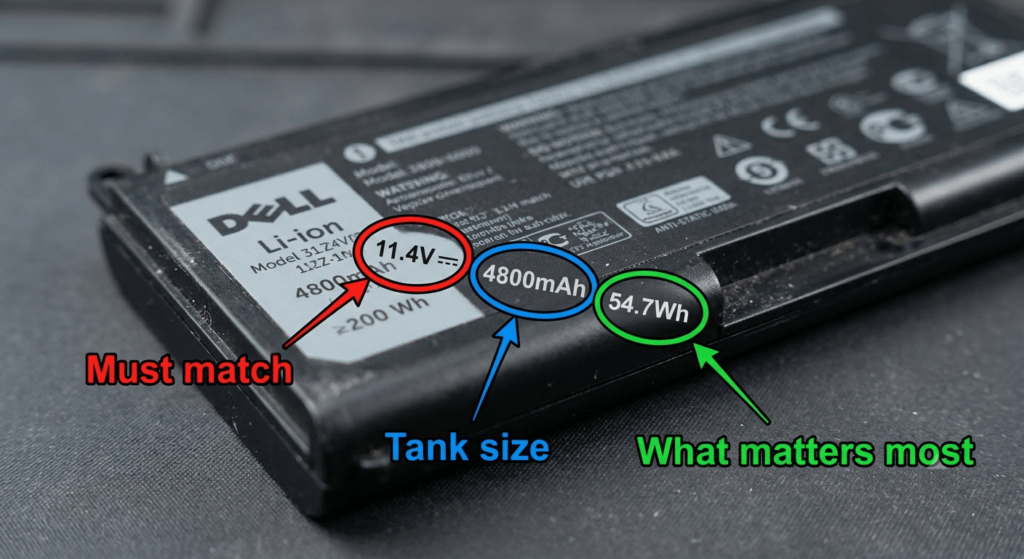
- Step 2: Compare Wh. Option A is 48Wh. Option B is 56Wh. Option B gives you about 17% more runtime. Pick B.
- Step 3: Ignore mAh unless voltages are identical. If both are 11.1V, then 4800mAh beats 4400mAh. But if the voltages differ, mAh is meaningless.
Example: you see an “upgraded 5200mAh” battery for $5 more than a standard 4400mAh. Both are 11.1V. The 5200mAh version works out to about 57.7Wh — that’s a genuine runtime upgrade worth the extra $5. But if the 5200mAh battery is 7.4V? It’s only 38.5Wh. You’d pay more for less runtime. Do the math before you click.
I tell people this: if you remember nothing else from this article, remember Wh. It’s the one number on the label that can’t lie to you.
Frequently Asked Questions
What does mAh mean on a laptop battery?
mAh stands for milliamp-hours. It’s how much electric charge the battery holds — like the size of a fuel tank. But it only tells half the story. Without knowing the voltage, you can’t compare two batteries using mAh alone.
What’s the difference between mAh and Wh?
mAh measures charge (how much fuel). Wh measures energy (how far you can go). Wh combines voltage and mAh together: Wh = V × mAh ÷ 1000. For laptops, always compare Wh — never mAh alone.
Does voltage matter when buying a replacement battery?
Yes. Voltage must match. A 10.8V and 11.1V battery are interchangeable (same 3-cell architecture). But a 14.8V battery cannot replace an 11.1V one — it could damage the charging circuit. Match the voltage on your original battery’s label.
Can I use a battery with higher Wh than my original?
Yes — as long as the voltage matches and it physically fits. A higher Wh battery at the same voltage gives you more runtime. This is one of the few legitimate “upgrades” available for laptop batteries.
Why do laptop batteries have different voltages?
Voltage depends on how many cells are connected in series inside the battery. Thin laptops use 2-cell (7.4V) packs. Mainstream laptops use 3-cell (10.8–11.1V). Gaming laptops and workstations use 4-cell (14.4–14.8V) for higher power output.
How do I know if a battery is 3-cell or 4-cell?
Look at the voltage. 10.8V or 11.1V = 3-cell. 14.4V or 14.8V = 4-cell. 7.4V or 7.6V = 2-cell. The cell count may also be printed on the label or in the product description.
What voltage should my laptop battery be?
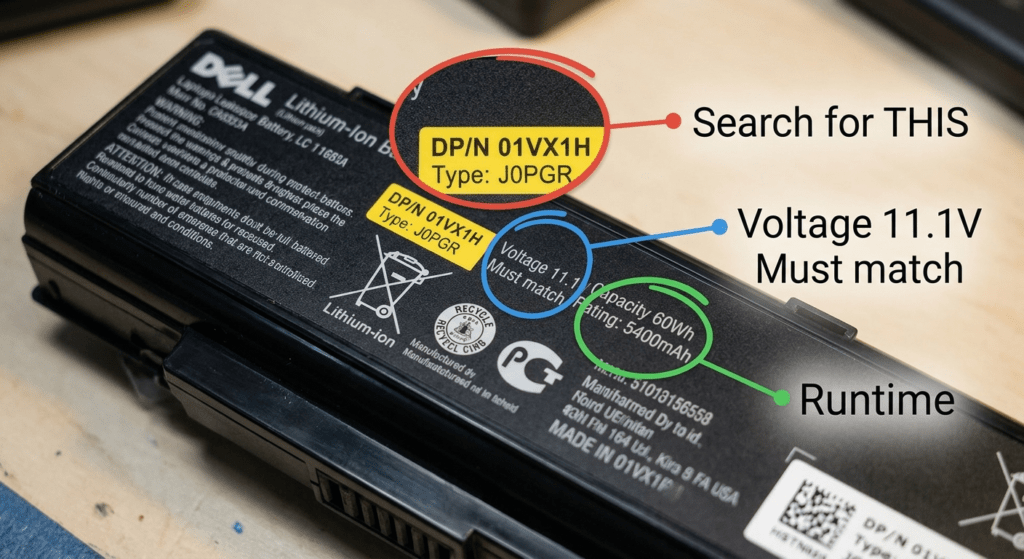
Read the label on your original battery. It’s printed there. Most consumer laptops are 10.8V or 11.1V (3-cell). Gaming laptops are usually 14.4V or 14.8V (4-cell). Ultrabooks may be 7.4V or 7.6V (2-cell).
How many Wh can I take on a plane?
Up to 100Wh per battery in carry-on luggage. Most laptop batteries fall well under this limit (30–99Wh). Above 100Wh requires airline approval. This is why airlines use Wh, not mAh — a 10,000mAh battery at 3.7V is fine (37Wh). At 14.8V, it’s 148Wh and restricted.
References & Sources
- IATA Lithium Battery Guidance — Airline carry-on limits for lithium batteries (100Wh rule) and UN 38.3 testing standards.
- UL Standards & Engagement — UL 1642 safety standard for lithium cells used in laptop battery packs.
- Federal Aviation Administration (FAA) — Lithium battery safety and passenger carry-on regulations.
Know Your Specs? Find Your Battery
Browse replacement batteries by exact part number. Every listing shows voltage and Wh so you know exactly what you’re getting.