Lithium-ion batteries swell when the electrolyte inside breaks down and produces flammable gas. The pressure builds until the casing bulges. If that casing ruptures, the gas can ignite on contact with air. That’s thermal runaway — a self-sustaining fire that burns at over 1,000°F and releases toxic fumes. It can’t be put out with water alone.
This guide covers how to spot swelling early, the immediate steps to take, how to get it fixed safely, and how to prevent it from happening again.
Part of our Laptop Battery Replacement Guide series. If your battery is just old — not swollen — check the warning signs guide instead.
1. Is It Really Swollen? 6 Signs
Swelling isn’t always obvious at first glance. Here’s what to look for.
| Sign | What to Check |
|---|---|
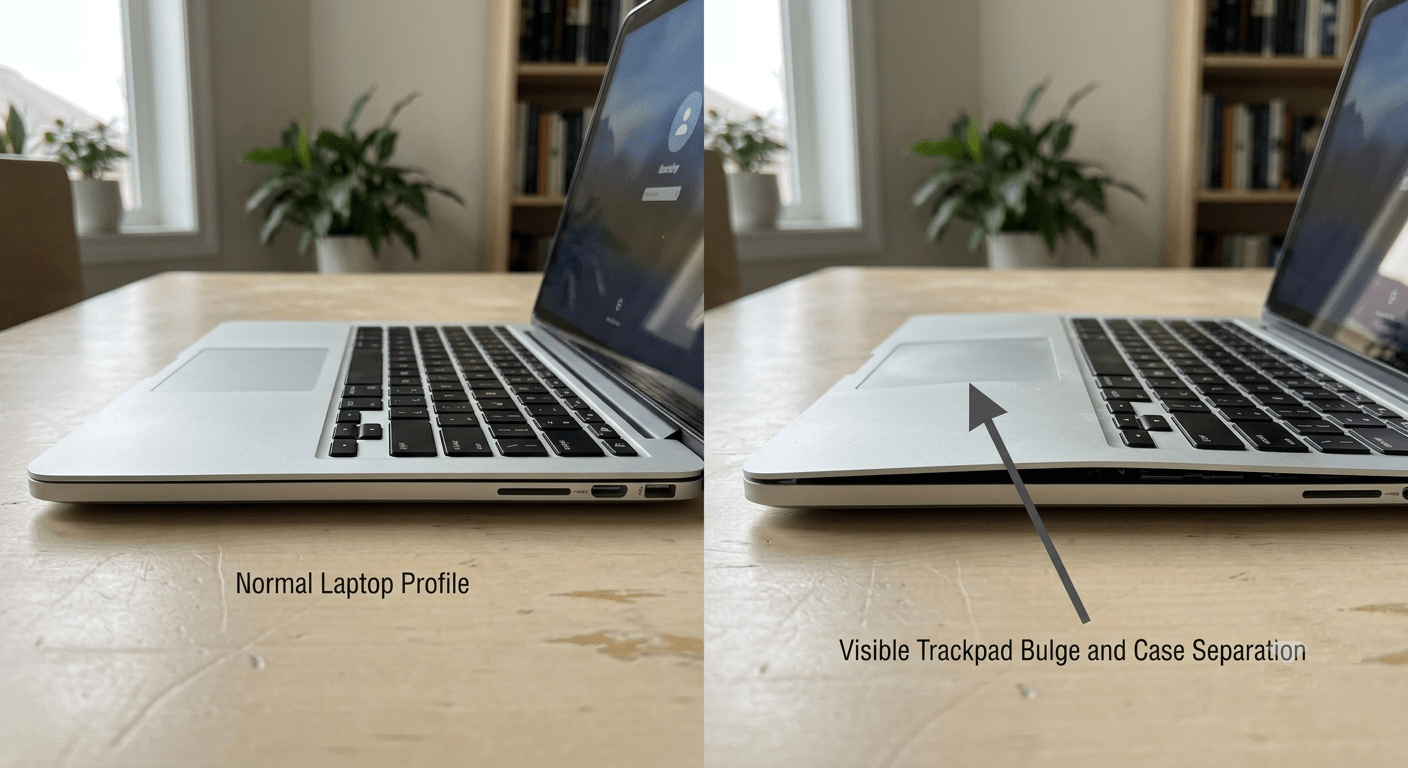
| 1. Keyboard or trackpad is lifting | Trackpad feels raised or hard to click. Keys in the center look higher than the edges. |
| 2. Laptop wobbles on a flat surface | Put it on a table. If it rocks, the bottom panel is warped from pressure underneath. |
| 3. Case seams are separating | Gaps appear between the top and bottom case along the edges. The clips are being forced apart. |
| 4. Screen won’t close flat | The lid leaves a gap when closed. The swollen battery is pushing up from inside. |
| 5. Sweet or chemical smell | A faint solvent-like odor from the vents. This is the electrolyte leaking as gas. |
| 6. Overheating at idle | The laptop feels hot even when doing nothing. The failing cells generate internal resistance → heat. |
One sign — keep watching. Two or more — it’s swollen. Act now.
2. Why This Is an Emergency
Inside every lithium-ion battery is a liquid electrolyte — a flammable solvent that lets lithium ions move between the electrodes. Over time, heat and chemical breakdown cause this electrolyte to decompose into gas. The gas builds up inside the sealed battery pack. Pressure increases. The casing bulges.
If the casing ruptures, that hot flammable gas meets oxygen. The result is thermal runaway — a chain reaction where the heat from one failing cell ignites the next, and the next, until the entire pack is on fire. Temperatures exceed 1,000°F. The fire produces its own oxygen, so smothering it doesn’t work.
This isn’t about your laptop’s performance. It’s about your safety. Treat a swollen battery the same way you’d treat a gas leak: stop using the device, get it away from anything flammable, and get it fixed by someone who knows what they’re doing.
I’ve opened enough swollen batteries to know the difference between a quality pack and a cheap one. The quality packs almost always fail gracefully — they stop charging, they trigger a warning, they give you time. The cheap ones just swell with no warning because the BMS never flagged the overcharge that caused it. That’s the part you can’t see when you’re comparing two listings by price alone.
3. Immediate Steps (Do These Now)
| Step | Action | Why |
|---|---|---|
| 1 | Stop using the laptop. Power off completely. | Current flowing through damaged cells accelerates gas production and heat buildup. |
| 2 | Unplug the charger — from the laptop AND the wall. | Charging a swollen battery is the single most dangerous thing you can do. It forces more current into already-damaged cells. |
| 3 | If it still powers on, let it drain on battery. | A discharged battery contains less stored energy. Less energy = less fuel if something goes wrong. |
| 4 | Move it to a non-flammable surface. | Concrete floor, tile, metal baking sheet, metal container. Away from carpets, curtains, papers. |
| 5 | If it catches fire — evacuate, call 911. | Lithium battery fires produce toxic hydrogen fluoride gas. Do not inhale the smoke. Use a CO₂ or foam extinguisher if you have one. |
I once had a customer bring in a laptop with a battery so swollen the trackpad had popped completely out of the case. They’d been using it for two weeks like that — “it still worked.” The battery was hot to the touch. We removed it outside on concrete, wearing safety glasses. Don’t be that person. When it swells, stop.
4. How to Get It Fixed
| Your Situation | Best Option |
|---|---|
| Battery is external / removable | Slide the latch, remove the battery outside on a non-flammable surface. Wear gloves and eye protection. Take the old battery to a disposal site. Install the new battery yourself. |
| Battery is internal / built-in | Do not attempt DIY removal. The battery is glued or clipped in — prying it out could puncture the swollen casing. Take it to a repair shop. |
| Laptop is under warranty | Contact the manufacturer. Dell, HP, Lenovo, and Apple all have special procedures for swollen batteries — some cover it even out of warranty. |
| You need to transport it | Place the laptop in a metal container or on a non-flammable surface in the trunk. Do not leave it in a hot car. Drive directly to the repair shop. |
If you take it to a shop, call ahead. Tell them you have a swollen battery. Some shops won’t handle them. Others have a specific drop-off procedure. Don’t just walk in and put it on the counter.
5. Safe Disposal
A swollen battery is hazardous waste. It cannot go in your household trash. Here’s where to take it:
- Electronics retailers: Best Buy, Home Depot, Lowe’s, and Staples often have battery recycling bins. Call first. Not all locations accept swollen or damaged batteries — some require special handling kits.
- Local hazardous waste facility: Most cities and counties have a household hazardous waste drop-off. Search “[your city] hazardous waste disposal.”
- Manufacturer take-back: Dell, HP, and Lenovo have mail-in recycling programs. But do NOT mail a swollen battery without contacting them first — they’ll provide special packaging.
The repair shop that removes the battery should also handle disposal for you. Ask when you drop it off.
I keep a simple rule: if my battery is over 3 years old or below 60% health, I replace it. I don’t wait for symptoms. A $40 replacement battery is a lot cheaper than a burnt desk — or worse. The best swollen battery is the one you never had because you replaced it before it failed.
6. How to Prevent This From Happening Again
Four things cause batteries to swell. All four are within your control.
| Cause | How to Prevent It |
|---|---|
| Overcharging / sitting at 100% | Set a charge limit to 60–80% if your laptop stays plugged in most of the time. Dell Power Manager, Lenovo Vantage, and ASUS MyASUS all have this feature. |
| Excessive heat | Use on hard surfaces. Clean vents every few months. Don’t leave your laptop in a hot car. Heat is the #1 accelerator of electrolyte breakdown. |
| Age (beyond 3–4 years) | Replace the battery proactively when it hits 3–4 years old or when health drops below 60%. Don’t wait for signs of failure. |
| Cheap, uncertified batteries | Buy Tier 1 compatible batteries with CE, RoHS, and UN 38.3 certifications. Cheap batteries skip the BMS features that prevent overcharging and overheating. |
 Frequently Asked Questions
What does a swollen laptop battery look like?
The keyboard or trackpad bulges upward. The laptop wobbles on a flat surface. Gaps appear between the top and bottom case. The screen may not close fully. In early stages, the bulge is subtle — look for uneven surfaces rather than an obvious balloon.
Is a swollen laptop battery dangerous?
Yes. A swollen battery contains flammable gas under pressure. If the casing ruptures, the gas can ignite, causing a self-sustaining fire (thermal runaway) that burns at over 1,000°F. Stop using the laptop and get it serviced immediately.
Can I still use my laptop if the battery is swollen?
No. Using or charging a swollen battery accelerates gas production and heat buildup inside the cells. Every minute the laptop runs increases the risk of rupture and fire. Power it off and unplug it.
Can I remove a swollen battery myself?
Only if the battery is external and removable with a latch. Remove it outside on concrete, wearing gloves and eye protection. If the battery is internal or glued in, do not attempt DIY removal — prying can puncture the swollen casing. Take it to a repair shop.
Will a swollen battery explode?
It can. If the casing ruptures and the flammable gas inside meets oxygen, thermal runaway occurs — the battery catches fire and can vent flames and toxic smoke. It’s not a guaranteed explosion, but the risk is real and increases the longer you wait.
How do I dispose of a swollen battery?
Take it to a household hazardous waste facility, or an electronics retailer with battery recycling (Best Buy, Home Depot, Staples). Call ahead — not all accept swollen batteries. Never put it in household trash.
What causes a laptop battery to swell?
The electrolyte inside the battery decomposes into gas due to overcharging, excessive heat, aging past 3–4 years, or physical damage. Cheap batteries with stripped-down BMS are more prone to swelling because they lack proper overcharge and temperature protection.
How can I prevent my battery from swelling?
Set a charge limit to 60–80% if you stay plugged in. Use on hard surfaces with good airflow. Replace the battery at 3–4 years old or when health drops below 60%. Buy quality batteries with CE, RoHS, and UN 38.3 certifications — not the cheapest listing.
References & Sources
- U.S. Consumer Product Safety Commission (CPSC) — Lithium-ion battery fire and overheating incident data (25,000+ incidents, 2017–2022).
- U.S. Environmental Protection Agency (EPA) — Battery disposal and hazardous waste guidance.
- OSHA — Workplace safety guidance for handling damaged lithium batteries.
Don’t Wait Until It Swells
If your battery is over 3 years old or below 60% health, replace it now. All our batteries are Tier 1 — full BMS, CE/RoHS/UN 38.3 certified, 1-year warranty.